

Map is not showing in the public portal
Fix a map that does not appear in the public portal. Check that Allow public access is on, Publishing mode is Public, and Show in public portal is on.
A map appears in the public portal when web access is on, Publishing mode is Public, and Show in public portal is on. Link-only and password-protected maps are not listed.
Most likely cause: Show in public portal is off
Open Map settings, then Access. In Publish to web, confirm that Allow public access is on, Publishing mode is Public, and Show in public portal is on.
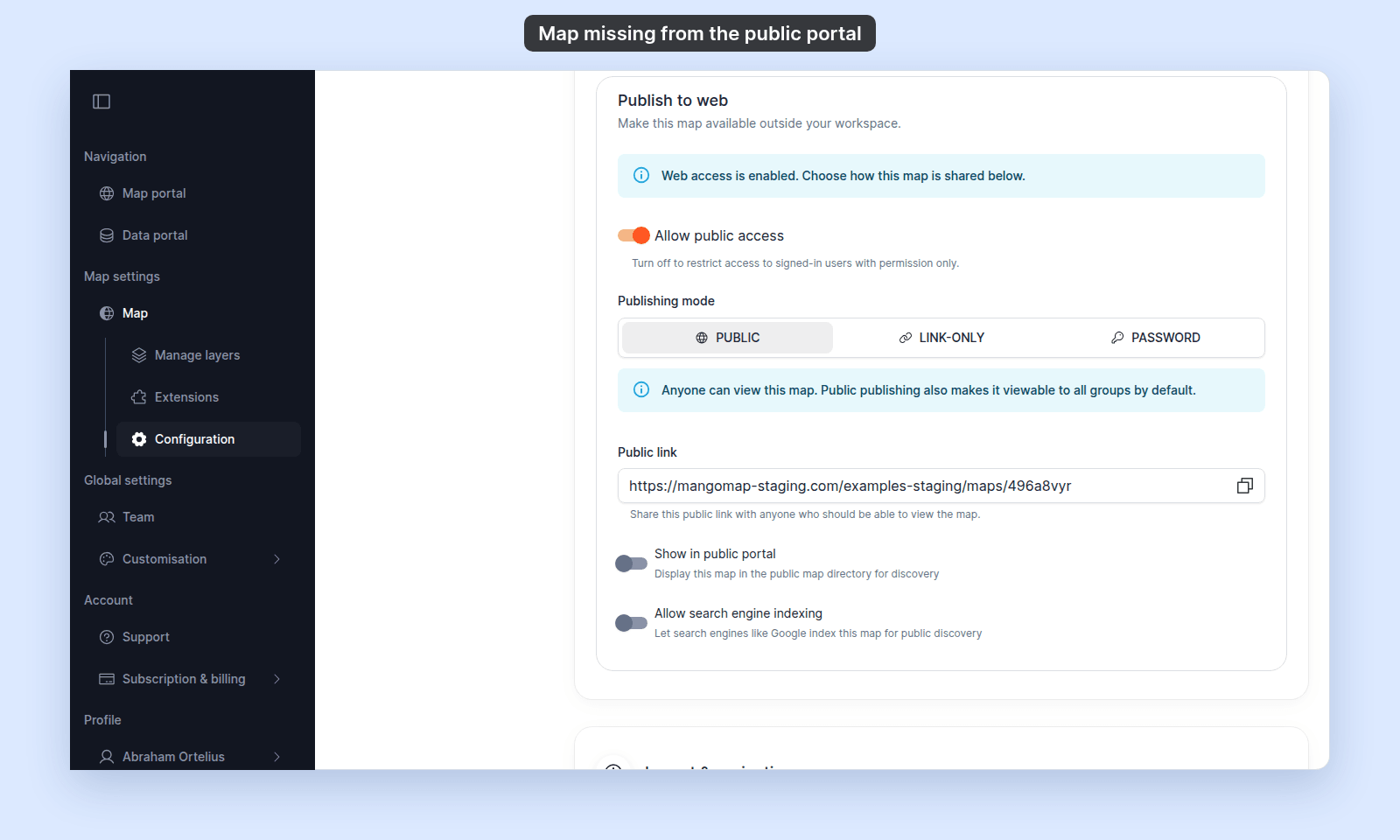
If Show in public portal is off, turn it on. The map can then appear in the public map directory.
Less common: the map is Link-only or Password
Link-only and Password maps are unlisted. They can be opened by direct link, but they do not appear in the public portal and are not indexed by search engines.
Switch Publishing mode to Public if the map should be listed in the public portal.
Less common: web access is off
When Allow public access is off, the map is restricted to signed-in users with permission. MangoMap also turns off Show in public portal and Allow search engine indexing.
Turn on Allow public access, choose Public, then turn on Show in public portal.
If none of the above
Ask support to check the map ID and public portal configuration. Include the map URL and the account name.