

How dataset access works in MangoMap
How public access, group access, and account roles decide who can view, download, and edit a dataset. A new dataset starts private to its creator.
A dataset is an item in your account’s data library. Its access settings control who can view or edit it and whether anyone on the web can open it. Dataset access is separate from map access: a public map can use a private dataset as a layer, and editing a layer’s data still depends on dataset access, not map access.
Default access on import
When you import data, the new dataset is private to you.
Public accessis off, so the dataset is not available outside your workspace.- No groups have access, so other users in your workspace cannot view or edit it.
- The dataset creator and the account owner can always view, edit, share, and delete the dataset, regardless of group access.
Grant access through Public access or groups when other people need to work with the dataset.
The two access models
Dataset access has two independent settings:
Public accessmakes the dataset publicly viewable and downloadable. Anyone on the web who reaches the dataset can open it.Internal Accesslets you grantVieworEditaccess to specific user groups in your workspace. Group access is for signed-in users only.
You can use either setting, both, or neither. Public access does not replace group access; it adds to it.
View vs. Edit
Group access has two switches per group:
Viewlets group members open the dataset and see its data.Editlets group members change the dataset.
Edit includes View. A group with Edit enabled can also view the dataset, even if View is off.
One Edit switch covers every kind of dataset change. A user with group Edit access can:
- Edit feature attributes and geometry on any map that uses the dataset as a layer (see Editing features).
- Update the dataset from a new file (see Importing data).
- Change dataset sync settings.
- Change dataset properties in
Configuration>Data details.
Separate switches do not exist. Edit grants all of these actions.
How dataset access combines with account roles
Group access is one part of what a user can do. The other is the user’s account role: Viewer, Editor, Admin, or Owner. The account owner is the user with the Owner role — at the top of the role hierarchy.
- Viewing a dataset only requires
View(orEdit) on a group the user belongs to. AViewerrole is enough. - Editing a dataset requires
Editon a group the user belongs to and an account role ofEditoror higher. AViewerwithEditaccess through a group still cannot edit the dataset. - Managing access for a dataset (changing the toggles in
Access) requiresEditon a group the user belongs to and an account role ofAdmin, or being the dataset creator or the account owner. A non-admin withEditaccess can edit the dataset but cannot change who else has access.
The dataset creator and account owner can always view, edit, share, and delete it. Group access is the only way to extend those rights to other workspace users.
Follow the checks from the top to see what one user can do with a dataset:
How dataset access relates to map access
Dataset access and map access are independent.
- A user who can view a map can see its layers, but the underlying dataset is only accessible to them through that map. Map access does not grant any rights on the dataset itself.
- A user who can open a map and use feature editing tools still cannot change the data unless they have
Editaccess on the dataset behind that layer. Editing tools are gated by dataset access, not by map access. - Making a map public does not make its layers’ datasets public. Map viewers can read the data through the map but cannot download or open the dataset directly.
- The exception is a map tool that exports results.
Download resultsin Advanced Search, the Query tool, and Proximity Analysis gives anyone who can open the map a file of the features they find, whatever the dataset access.
A public map can show a private dataset, but it does not open the dataset to its viewers:
If you want viewers to be able to download a dataset or open it on its own, turn on Public access for the dataset, not for the map.
The View-follows-Edit and View-follows-Public rules
The Access UI links View to other settings to keep them consistent.
- When a group has
Editenabled, the group’sViewswitch is forced on and disabled. - When
Public accessis on, every group’sViewswitch is forced on and disabled. The dataset is publicly viewable, so signed-in groups can view it as well. GroupEditswitches stay independent.
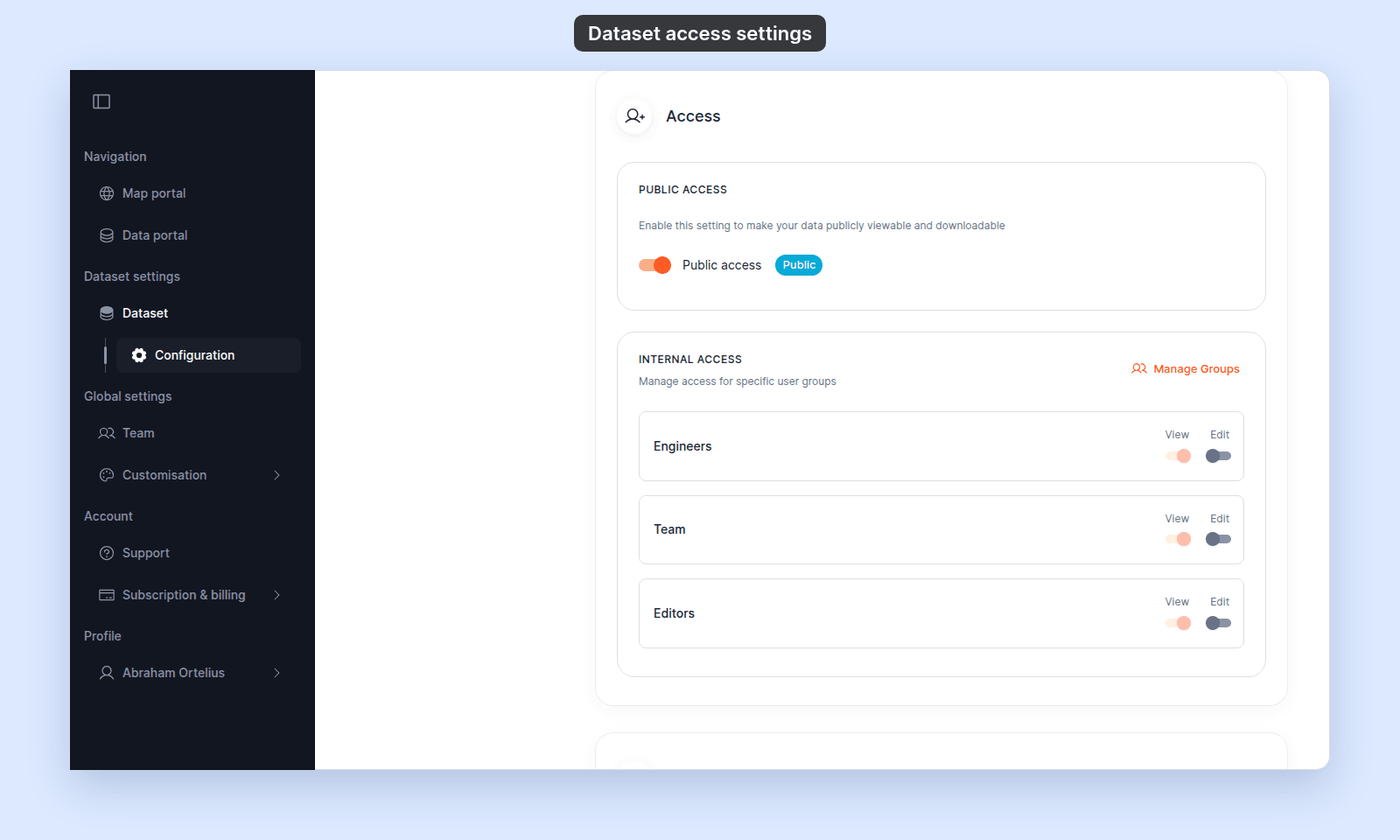
To change a group’s view access while these rules are active, turn off Edit for that group, or turn off Public access for the dataset.
Related
- Dataset access settings
- How to configure dataset access
- How to share a dataset with groups
- How to share a dataset publicly
- Account roles reference - the canonical “who can do what” matrix.
- How feature editing works in MangoMap
- How map access works in MangoMap