

Account roles reference
Check what Viewer, Editor, Admin, and Owner roles can do in MangoMap, and how access groups and creator overrides change that.
This is the canonical answer to “who can do what” in a MangoMap account. Use it when you’re deciding what role to give a teammate, troubleshooting why a teammate can’t do something, or auditing who has access to what. Roles always combine with access groups for per-map and per-dataset actions; the tables below show both.
For the framing — what the roles are, how the creator and owner overrides work, why some thresholds are different — see How account roles work in MangoMap.
At a glance
| Role | What they can do | Counts toward paid seats |
|---|---|---|
Viewer |
View maps and datasets shared with them. No editing. No creating. | No (free seat). |
Editor |
Everything Viewer does, plus edit dataset content (attributes, geometry, file updates, sync) on items their group has Edit access to. |
Yes. |
Admin |
Everything Editor does, plus edit map configuration, create maps and datasets, import data, delete data, and manage map and dataset access. |
Yes. |
Owner |
Everything Admin does, plus invite users, manage roles and groups, customise the account, and manage subscription and billing. One per account. |
Yes (one seat). |
Hierarchy: Viewer < Editor < Admin < Owner. Each role can do everything the role below it can.
Account-wide capabilities
These actions don’t apply to a specific map or dataset — they govern the account as a whole.
| Action | Viewer |
Editor |
Admin |
Owner |
|---|---|---|---|---|
| Sign in to MangoMap | Yes | Yes | Yes | Yes |
| Be a member of an account | Yes | Yes | Yes | Yes |
| Create a map | No | No | Yes | Yes |
| Create a dataset / import data | No | No | Yes | Yes |
| Delete data (on items the user has rights to) | No | No | Yes | Yes |
Open the Users page (invite, update, remove users) |
No | No | No | Yes |
| Create, edit, or delete an access group | No | No | No | Yes |
Open the Customisation menu (Brand, Localisation, Domain & whitelabel, Portal config, Analytics) |
No | No | No | Yes |
Open the Subscription & billing pages |
No | No | No | Yes |
The team invite and update forms offer Admin, Editor, and Viewer. They cannot assign Owner.
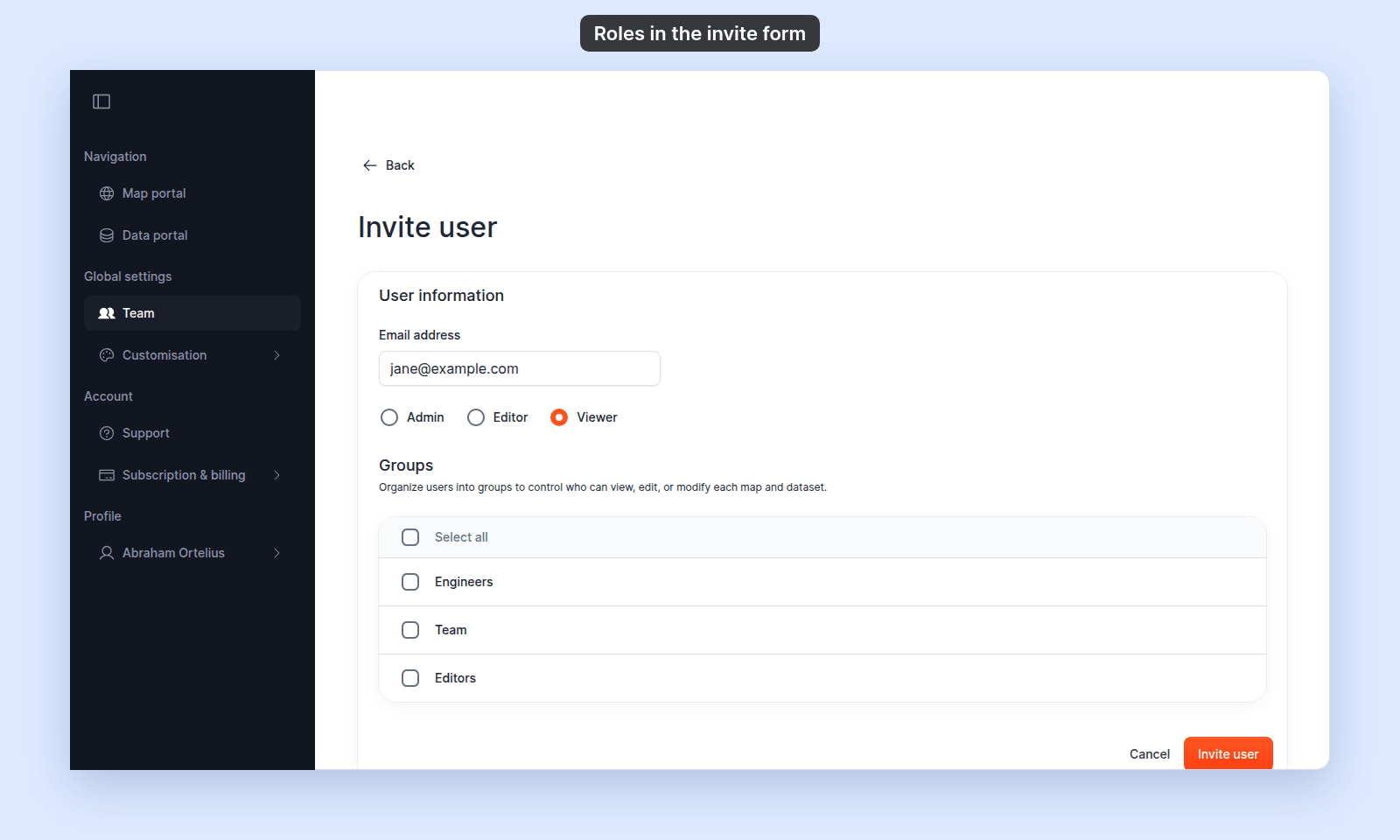
Viewer, Editor, and Admin users cannot open team, customisation, or subscription pages — those pages are for the account owner only.
Per-map actions
These apply to a specific map. The required side is what the user must satisfy.
| Action | Required |
|---|---|
| View | Map is public OR user is the map creator OR user is the account owner OR user is in a group with View (or Edit) access on this map. |
| Edit (configuration, layers, styling, popups) | User is the map creator OR account owner OR (Admin role AND in a group with Edit access on this map). |
| Share / change access toggles | Same as edit. |
| Delete | The user is the map creator or account owner. Groups cannot grant this right. |
Notable consequences:
- An
Editorin a group withEditaccess on a map cannot edit the map. The role isn’t high enough; raise toAdminif they need to configure maps. - A teammate cannot delete a map even if they have
Editaccess through a group, unless they are the creator or the account owner. - “Share” follows “edit”: if a user can edit the map, they can change who else has access.
Per-dataset actions
These apply to a specific dataset.
| Action | Required |
|---|---|
| View | Dataset is public OR user is the dataset creator OR account owner OR user is in a group with View (or Edit) access on this dataset. |
| Edit (attribute and geometry edits, update from file, sync settings, dataset properties and configuration) | User is the dataset creator OR account owner OR (Editor role AND in a group with Edit access on this dataset). |
| Edit features on maps that use this dataset | Same as edit dataset. |
Manage access (toggles in Internal Access and Public Access) |
User is the dataset creator OR account owner OR (Admin role AND in a group with Edit access on this dataset). |
| Delete | User is the dataset creator OR account owner OR (Admin role AND in a group with Edit access on this dataset). |
| Export | Same as view. |
Notable consequences:
- The edit threshold for a dataset is
Editor+, but the manage-access threshold isAdmin+. AnEditorwith groupEditcan change the data but cannot grant another group access to the dataset. - The edit threshold for a dataset (
Editor+) is lower than for a map (Admin+). AnEditorwith groupEditon both a map and a dataset can edit the dataset’s content but not the map’s configuration. - Deleting a dataset allows the
Adminplus group-edit path, while deleting a map does not.
The creator and owner overrides
Two overrides apply to every action above:
- Creator override — the user who created a specific map or dataset always has full rights to it: view, edit, share, delete. The creator override is per-item; it doesn’t change the user’s role or grant access to anything else.
- Owner override — the account owner has full rights to every map and every dataset in the account, regardless of group access or who created them. The owner is also the only user who can open team, customisation, and subscription pages.
Neither override depends on group membership. A creator who is in no groups still has full rights to what they made; an owner can do anything in the account whether or not they belong to any group.