---
title: "My style change isn't appearing on the map"
description: "Find out why a style change does not show on the map. The Style tab only applies changes after you click Save, and a few other causes can stop it."
seo:
  title: "Style change not appearing"
sidebar:
  label: "Style change not appearing"
---

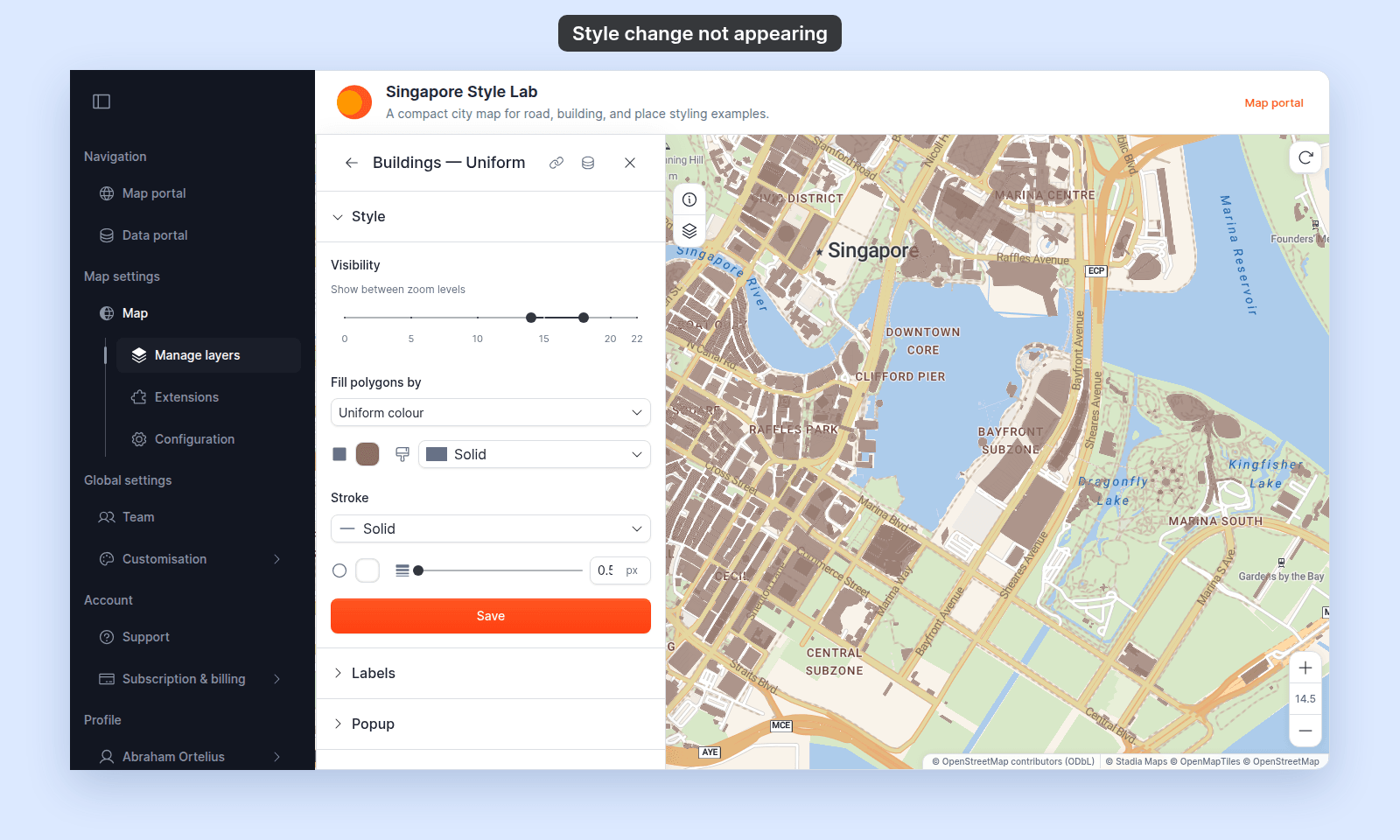
You changed a style, but the map looks the same. The usual cause: changes on the `Style` tab don't apply until you click the save button at the bottom. Closing the panel or switching tabs first discards the changes.

This page covers the common reasons a style change doesn't appear. They apply to point, line, and polygon layers alike unless a section says otherwise.

Work through the checks in this order. Each one has its own section below.

<!-- diagram:style-not-applying-checks -->
<svg class="dark:hidden" style="width: 100%; height: auto" viewBox="0 0 640 724" xmlns="http://www.w3.org/2000/svg" role="img" aria-labelledby="style-not-applying-checks-inline-title style-not-applying-checks-inline-desc">
  <title id="style-not-applying-checks-inline-title">Why a style change isn't showing</title>
  <desc id="style-not-applying-checks-inline-desc">Flowchart of five checks in order: click Save if you haven't; zoom into the Visibility range; turn the layer's eye icon on; move the layer above any layer drawn on top of it; show the row its features use, or lower the first class break; if all five pass, see Still not appearing.</desc>
  <defs>
    <marker id="style-not-applying-checks-inline-arrow" markerWidth="8" markerHeight="6" refX="7" refY="3" orient="auto"><polygon points="0 0, 8 3, 0 6" fill="#525252"/></marker>
    <marker id="style-not-applying-checks-inline-arrow-accent" markerWidth="8" markerHeight="6" refX="7" refY="3" orient="auto"><polygon points="0 0, 8 3, 0 6" fill="#c4360c"/></marker>
  </defs>
  <rect width="100%" height="100%" fill="#f5f5f5"/>
  <path d="M184 60 L184 82" fill="none" stroke="#525252" stroke-width="1.2" marker-end="url(#style-not-applying-checks-inline-arrow)"/>
  <path d="M320 128 L374 128" fill="none" stroke="#c4360c" stroke-width="1.4" marker-end="url(#style-not-applying-checks-inline-arrow-accent)"/>
  <path d="M320 240 L374 240" fill="none" stroke="#525252" stroke-width="1.2" marker-end="url(#style-not-applying-checks-inline-arrow)"/>
  <path d="M320 352 L374 352" fill="none" stroke="#525252" stroke-width="1.2" marker-end="url(#style-not-applying-checks-inline-arrow)"/>
  <path d="M320 464 L374 464" fill="none" stroke="#525252" stroke-width="1.2" marker-end="url(#style-not-applying-checks-inline-arrow)"/>
  <path d="M320 576 L374 576" fill="none" stroke="#525252" stroke-width="1.2" marker-end="url(#style-not-applying-checks-inline-arrow)"/>
  <path d="M184 172 L184 194" fill="none" stroke="#525252" stroke-width="1.2" marker-end="url(#style-not-applying-checks-inline-arrow)"/>
  <path d="M184 284 L184 306" fill="none" stroke="#525252" stroke-width="1.2" marker-end="url(#style-not-applying-checks-inline-arrow)"/>
  <path d="M184 396 L184 418" fill="none" stroke="#525252" stroke-width="1.2" marker-end="url(#style-not-applying-checks-inline-arrow)"/>
  <path d="M184 508 L184 530" fill="none" stroke="#525252" stroke-width="1.2" marker-end="url(#style-not-applying-checks-inline-arrow)"/>
  <path d="M184 620 L184 650" fill="none" stroke="#525252" stroke-width="1.2" marker-end="url(#style-not-applying-checks-inline-arrow)"/>
  <rect x="335" y="104" width="26" height="16" rx="2" fill="#f5f5f5"/><text x="348" y="116" fill="#525252" font-size="10" font-weight="600" letter-spacing="0.1em" font-family="inherit" text-anchor="middle">NO</text>
  <rect x="335" y="216" width="26" height="16" rx="2" fill="#f5f5f5"/><text x="348" y="228" fill="#525252" font-size="10" font-weight="600" letter-spacing="0.1em" font-family="inherit" text-anchor="middle">NO</text>
  <rect x="335" y="328" width="26" height="16" rx="2" fill="#f5f5f5"/><text x="348" y="340" fill="#525252" font-size="10" font-weight="600" letter-spacing="0.1em" font-family="inherit" text-anchor="middle">NO</text>
  <rect x="331" y="440" width="34" height="16" rx="2" fill="#f5f5f5"/><text x="348" y="452" fill="#525252" font-size="10" font-weight="600" letter-spacing="0.1em" font-family="inherit" text-anchor="middle">YES</text>
  <rect x="331" y="552" width="34" height="16" rx="2" fill="#f5f5f5"/><text x="348" y="564" fill="#525252" font-size="10" font-weight="600" letter-spacing="0.1em" font-family="inherit" text-anchor="middle">YES</text>
  <rect x="192" y="178" width="34" height="16" rx="2" fill="#f5f5f5"/><text x="209" y="190" fill="#525252" font-size="10" font-weight="600" letter-spacing="0.1em" font-family="inherit" text-anchor="middle">YES</text>
  <rect x="192" y="290" width="34" height="16" rx="2" fill="#f5f5f5"/><text x="209" y="302" fill="#525252" font-size="10" font-weight="600" letter-spacing="0.1em" font-family="inherit" text-anchor="middle">YES</text>
  <rect x="192" y="402" width="34" height="16" rx="2" fill="#f5f5f5"/><text x="209" y="414" fill="#525252" font-size="10" font-weight="600" letter-spacing="0.1em" font-family="inherit" text-anchor="middle">YES</text>
  <rect x="192" y="514" width="26" height="16" rx="2" fill="#f5f5f5"/><text x="205" y="526" fill="#525252" font-size="10" font-weight="600" letter-spacing="0.1em" font-family="inherit" text-anchor="middle">NO</text>
  <rect x="192" y="626" width="26" height="16" rx="2" fill="#f5f5f5"/><text x="205" y="638" fill="#525252" font-size="10" font-weight="600" letter-spacing="0.1em" font-family="inherit" text-anchor="middle">NO</text>
  <rect x="68" y="16" width="232" height="44" rx="20" fill="rgba(23,23,23,0.04)" stroke="rgba(23,23,23,0.32)" stroke-width="1"/>
  <text x="184" y="43" fill="#171717" font-size="14" font-weight="600" font-family="inherit" text-anchor="middle">The map looks the same</text>
  <polygon points="184,84 320,128 184,172 48,128" fill="rgba(196,54,12,0.08)" stroke="#c4360c" stroke-width="1.4"/><text x="184" y="123" fill="#171717" font-size="14" font-weight="600" font-family="inherit" text-anchor="middle">Clicked Save after</text><text x="184" y="141" fill="#171717" font-size="14" font-weight="600" font-family="inherit" text-anchor="middle">the change?</text>
  <polygon points="184,196 320,240 184,284 48,240" fill="#ffffff" stroke="#171717" stroke-width="1"/><text x="184" y="235" fill="#171717" font-size="14" font-weight="600" font-family="inherit" text-anchor="middle">Map zoom inside the</text><text x="184" y="253" fill="#171717" font-size="14" font-weight="600" font-family="inherit" text-anchor="middle">Visibility range?</text>
  <polygon points="184,308 320,352 184,396 48,352" fill="#ffffff" stroke="#171717" stroke-width="1"/><text x="184" y="356" fill="#171717" font-size="14" font-weight="600" font-family="inherit" text-anchor="middle">Layer’s eye icon on?</text>
  <polygon points="184,420 320,464 184,508 48,464" fill="#ffffff" stroke="#171717" stroke-width="1"/><text x="184" y="459" fill="#171717" font-size="14" font-weight="600" font-family="inherit" text-anchor="middle">Another layer</text><text x="184" y="477" fill="#171717" font-size="14" font-weight="600" font-family="inherit" text-anchor="middle">drawn on top?</text>
  <polygon points="184,532 320,576 184,620 48,576" fill="#ffffff" stroke="#171717" stroke-width="1"/><text x="184" y="571" fill="#171717" font-size="14" font-weight="600" font-family="inherit" text-anchor="middle">Features in a hidden</text><text x="184" y="589" fill="#171717" font-size="14" font-weight="600" font-family="inherit" text-anchor="middle">row or no class?</text>
  <rect x="376" y="100" width="248" height="56" rx="20" fill="rgba(196,54,12,0.08)" stroke="#c4360c" stroke-width="1.4"/><text x="500" y="124" fill="#171717" font-size="14" font-weight="600" font-family="inherit" text-anchor="middle">Click Save</text><text x="500" y="142" fill="#525252" font-size="12" font-family="inherit" text-anchor="middle">Save Style on raster and WMS</text>
  <rect x="376" y="212" width="248" height="56" rx="20" fill="rgba(23,23,23,0.04)" stroke="rgba(23,23,23,0.32)" stroke-width="1"/><text x="500" y="236" fill="#171717" font-size="14" font-weight="600" font-family="inherit" text-anchor="middle">Zoom into the range</text><text x="500" y="254" fill="#525252" font-size="12" font-family="inherit" text-anchor="middle">or widen the Visibility range</text>
  <rect x="376" y="324" width="248" height="56" rx="20" fill="rgba(23,23,23,0.04)" stroke="rgba(23,23,23,0.32)" stroke-width="1"/><text x="500" y="348" fill="#171717" font-size="14" font-weight="600" font-family="inherit" text-anchor="middle">Turn the eye icon on</text><text x="500" y="366" fill="#525252" font-size="12" font-family="inherit" text-anchor="middle">in Manage layers</text>
  <rect x="376" y="436" width="248" height="56" rx="20" fill="rgba(23,23,23,0.04)" stroke="rgba(23,23,23,0.32)" stroke-width="1"/><text x="500" y="460" fill="#171717" font-size="14" font-weight="600" font-family="inherit" text-anchor="middle">Move your layer up</text><text x="500" y="478" fill="#525252" font-size="12" font-family="inherit" text-anchor="middle">or lower the cover’s fill opacity</text>
  <rect x="376" y="548" width="248" height="56" rx="20" fill="rgba(23,23,23,0.04)" stroke="rgba(23,23,23,0.32)" stroke-width="1"/><text x="500" y="572" fill="#171717" font-size="14" font-weight="600" font-family="inherit" text-anchor="middle">Check the rows</text><text x="500" y="590" fill="#525252" font-size="12" font-family="inherit" text-anchor="middle">show the row, or lower the first break</text>
  <rect x="52" y="654" width="264" height="56" rx="20" fill="rgba(23,23,23,0.04)" stroke="rgba(23,23,23,0.32)" stroke-width="1"/>
  <text x="184" y="678" fill="#171717" font-size="14" font-weight="600" font-family="inherit" text-anchor="middle">Still not appearing</text>
  <text x="184" y="696" fill="#525252" font-size="12" font-family="inherit" text-anchor="middle">check edit access and the layer name</text>
</svg>
<svg class="hidden dark:block" style="width: 100%; height: auto" viewBox="0 0 640 724" xmlns="http://www.w3.org/2000/svg" role="img" aria-labelledby="style-not-applying-checks-inline-dark-title style-not-applying-checks-inline-dark-desc">
  <title id="style-not-applying-checks-inline-dark-title">Why a style change isn't showing</title>
  <desc id="style-not-applying-checks-inline-dark-desc">Flowchart of five checks in order: click Save if you haven't; zoom into the Visibility range; turn the layer's eye icon on; move the layer above any layer drawn on top of it; show the row its features use, or lower the first class break; if all five pass, see Still not appearing.</desc>
  <defs>
    <marker id="style-not-applying-checks-inline-dark-arrow" markerWidth="8" markerHeight="6" refX="7" refY="3" orient="auto"><polygon points="0 0, 8 3, 0 6" fill="#a3a3a3"/></marker>
    <marker id="style-not-applying-checks-inline-dark-arrow-accent" markerWidth="8" markerHeight="6" refX="7" refY="3" orient="auto"><polygon points="0 0, 8 3, 0 6" fill="#ff7a4d"/></marker>
  </defs>
  <rect width="100%" height="100%" fill="#141414"/>
  <path d="M184 60 L184 82" fill="none" stroke="#a3a3a3" stroke-width="1.2" marker-end="url(#style-not-applying-checks-inline-dark-arrow)"/>
  <path d="M320 128 L374 128" fill="none" stroke="#ff7a4d" stroke-width="1.4" marker-end="url(#style-not-applying-checks-inline-dark-arrow-accent)"/>
  <path d="M320 240 L374 240" fill="none" stroke="#a3a3a3" stroke-width="1.2" marker-end="url(#style-not-applying-checks-inline-dark-arrow)"/>
  <path d="M320 352 L374 352" fill="none" stroke="#a3a3a3" stroke-width="1.2" marker-end="url(#style-not-applying-checks-inline-dark-arrow)"/>
  <path d="M320 464 L374 464" fill="none" stroke="#a3a3a3" stroke-width="1.2" marker-end="url(#style-not-applying-checks-inline-dark-arrow)"/>
  <path d="M320 576 L374 576" fill="none" stroke="#a3a3a3" stroke-width="1.2" marker-end="url(#style-not-applying-checks-inline-dark-arrow)"/>
  <path d="M184 172 L184 194" fill="none" stroke="#a3a3a3" stroke-width="1.2" marker-end="url(#style-not-applying-checks-inline-dark-arrow)"/>
  <path d="M184 284 L184 306" fill="none" stroke="#a3a3a3" stroke-width="1.2" marker-end="url(#style-not-applying-checks-inline-dark-arrow)"/>
  <path d="M184 396 L184 418" fill="none" stroke="#a3a3a3" stroke-width="1.2" marker-end="url(#style-not-applying-checks-inline-dark-arrow)"/>
  <path d="M184 508 L184 530" fill="none" stroke="#a3a3a3" stroke-width="1.2" marker-end="url(#style-not-applying-checks-inline-dark-arrow)"/>
  <path d="M184 620 L184 650" fill="none" stroke="#a3a3a3" stroke-width="1.2" marker-end="url(#style-not-applying-checks-inline-dark-arrow)"/>
  <rect x="335" y="104" width="26" height="16" rx="2" fill="#141414"/><text x="348" y="116" fill="#a3a3a3" font-size="10" font-weight="600" letter-spacing="0.1em" font-family="inherit" text-anchor="middle">NO</text>
  <rect x="335" y="216" width="26" height="16" rx="2" fill="#141414"/><text x="348" y="228" fill="#a3a3a3" font-size="10" font-weight="600" letter-spacing="0.1em" font-family="inherit" text-anchor="middle">NO</text>
  <rect x="335" y="328" width="26" height="16" rx="2" fill="#141414"/><text x="348" y="340" fill="#a3a3a3" font-size="10" font-weight="600" letter-spacing="0.1em" font-family="inherit" text-anchor="middle">NO</text>
  <rect x="331" y="440" width="34" height="16" rx="2" fill="#141414"/><text x="348" y="452" fill="#a3a3a3" font-size="10" font-weight="600" letter-spacing="0.1em" font-family="inherit" text-anchor="middle">YES</text>
  <rect x="331" y="552" width="34" height="16" rx="2" fill="#141414"/><text x="348" y="564" fill="#a3a3a3" font-size="10" font-weight="600" letter-spacing="0.1em" font-family="inherit" text-anchor="middle">YES</text>
  <rect x="192" y="178" width="34" height="16" rx="2" fill="#141414"/><text x="209" y="190" fill="#a3a3a3" font-size="10" font-weight="600" letter-spacing="0.1em" font-family="inherit" text-anchor="middle">YES</text>
  <rect x="192" y="290" width="34" height="16" rx="2" fill="#141414"/><text x="209" y="302" fill="#a3a3a3" font-size="10" font-weight="600" letter-spacing="0.1em" font-family="inherit" text-anchor="middle">YES</text>
  <rect x="192" y="402" width="34" height="16" rx="2" fill="#141414"/><text x="209" y="414" fill="#a3a3a3" font-size="10" font-weight="600" letter-spacing="0.1em" font-family="inherit" text-anchor="middle">YES</text>
  <rect x="192" y="514" width="26" height="16" rx="2" fill="#141414"/><text x="205" y="526" fill="#a3a3a3" font-size="10" font-weight="600" letter-spacing="0.1em" font-family="inherit" text-anchor="middle">NO</text>
  <rect x="192" y="626" width="26" height="16" rx="2" fill="#141414"/><text x="205" y="638" fill="#a3a3a3" font-size="10" font-weight="600" letter-spacing="0.1em" font-family="inherit" text-anchor="middle">NO</text>
  <rect x="68" y="16" width="232" height="44" rx="20" fill="rgba(242,242,242,0.05)" stroke="rgba(242,242,242,0.34)" stroke-width="1"/>
  <text x="184" y="43" fill="#f2f2f2" font-size="14" font-weight="600" font-family="inherit" text-anchor="middle">The map looks the same</text>
  <polygon points="184,84 320,128 184,172 48,128" fill="rgba(255,122,77,0.10)" stroke="#ff7a4d" stroke-width="1.4"/><text x="184" y="123" fill="#f2f2f2" font-size="14" font-weight="600" font-family="inherit" text-anchor="middle">Clicked Save after</text><text x="184" y="141" fill="#f2f2f2" font-size="14" font-weight="600" font-family="inherit" text-anchor="middle">the change?</text>
  <polygon points="184,196 320,240 184,284 48,240" fill="#1c1c1c" stroke="#f2f2f2" stroke-width="1"/><text x="184" y="235" fill="#f2f2f2" font-size="14" font-weight="600" font-family="inherit" text-anchor="middle">Map zoom inside the</text><text x="184" y="253" fill="#f2f2f2" font-size="14" font-weight="600" font-family="inherit" text-anchor="middle">Visibility range?</text>
  <polygon points="184,308 320,352 184,396 48,352" fill="#1c1c1c" stroke="#f2f2f2" stroke-width="1"/><text x="184" y="356" fill="#f2f2f2" font-size="14" font-weight="600" font-family="inherit" text-anchor="middle">Layer’s eye icon on?</text>
  <polygon points="184,420 320,464 184,508 48,464" fill="#1c1c1c" stroke="#f2f2f2" stroke-width="1"/><text x="184" y="459" fill="#f2f2f2" font-size="14" font-weight="600" font-family="inherit" text-anchor="middle">Another layer</text><text x="184" y="477" fill="#f2f2f2" font-size="14" font-weight="600" font-family="inherit" text-anchor="middle">drawn on top?</text>
  <polygon points="184,532 320,576 184,620 48,576" fill="#1c1c1c" stroke="#f2f2f2" stroke-width="1"/><text x="184" y="571" fill="#f2f2f2" font-size="14" font-weight="600" font-family="inherit" text-anchor="middle">Features in a hidden</text><text x="184" y="589" fill="#f2f2f2" font-size="14" font-weight="600" font-family="inherit" text-anchor="middle">row or no class?</text>
  <rect x="376" y="100" width="248" height="56" rx="20" fill="rgba(255,122,77,0.10)" stroke="#ff7a4d" stroke-width="1.4"/><text x="500" y="124" fill="#f2f2f2" font-size="14" font-weight="600" font-family="inherit" text-anchor="middle">Click Save</text><text x="500" y="142" fill="#a3a3a3" font-size="12" font-family="inherit" text-anchor="middle">Save Style on raster and WMS</text>
  <rect x="376" y="212" width="248" height="56" rx="20" fill="rgba(242,242,242,0.05)" stroke="rgba(242,242,242,0.34)" stroke-width="1"/><text x="500" y="236" fill="#f2f2f2" font-size="14" font-weight="600" font-family="inherit" text-anchor="middle">Zoom into the range</text><text x="500" y="254" fill="#a3a3a3" font-size="12" font-family="inherit" text-anchor="middle">or widen the Visibility range</text>
  <rect x="376" y="324" width="248" height="56" rx="20" fill="rgba(242,242,242,0.05)" stroke="rgba(242,242,242,0.34)" stroke-width="1"/><text x="500" y="348" fill="#f2f2f2" font-size="14" font-weight="600" font-family="inherit" text-anchor="middle">Turn the eye icon on</text><text x="500" y="366" fill="#a3a3a3" font-size="12" font-family="inherit" text-anchor="middle">in Manage layers</text>
  <rect x="376" y="436" width="248" height="56" rx="20" fill="rgba(242,242,242,0.05)" stroke="rgba(242,242,242,0.34)" stroke-width="1"/><text x="500" y="460" fill="#f2f2f2" font-size="14" font-weight="600" font-family="inherit" text-anchor="middle">Move your layer up</text><text x="500" y="478" fill="#a3a3a3" font-size="12" font-family="inherit" text-anchor="middle">or lower the cover’s fill opacity</text>
  <rect x="376" y="548" width="248" height="56" rx="20" fill="rgba(242,242,242,0.05)" stroke="rgba(242,242,242,0.34)" stroke-width="1"/><text x="500" y="572" fill="#f2f2f2" font-size="14" font-weight="600" font-family="inherit" text-anchor="middle">Check the rows</text><text x="500" y="590" fill="#a3a3a3" font-size="12" font-family="inherit" text-anchor="middle">show the row, or lower the first break</text>
  <rect x="52" y="654" width="264" height="56" rx="20" fill="rgba(242,242,242,0.05)" stroke="rgba(242,242,242,0.34)" stroke-width="1"/>
  <text x="184" y="678" fill="#f2f2f2" font-size="14" font-weight="600" font-family="inherit" text-anchor="middle">Still not appearing</text>
  <text x="184" y="696" fill="#a3a3a3" font-size="12" font-family="inherit" text-anchor="middle">check edit access and the layer name</text>
</svg>
<!-- /diagram:style-not-applying-checks -->

## You haven't clicked the save button

Unlike most other settings in MangoMap, the `Style` tab uses an explicit save. Every control on the tab — colour, classification, symbol, opacity, zoom range, per-row customisation — waits until you click the save button at the bottom of the panel:

- **Vector layers** (point, line, polygon): the button is labelled `Save`.
- **Raster and WMS layers**: the button is labelled `Save Style`.

**Fix**: scroll to the bottom of the `Style` tab and click the save button. It shows `Saving…` while it saves.

<img src="/_assets/styling-layers/troubleshoot-style-not-applying--save.png" alt="Style section of the Buildings — Uniform layer, with the Visibility zoom range slider at the top and the Save button at the end" width="1600" height="960" />

If you've already closed the layer settings, your changes are lost — re-open the layer and redo them.

## You're outside the layer's zoom-visibility range

The `Visibility` slider on the Style tab restricts which zoom levels the layer renders at. If you're viewing the map outside the slider's range, the layer is invisible regardless of any style change. The range includes both ends: a layer set to `14`–`18` shows at zoom 18 and hides above it.

**Fix**: open the Style tab, check the `Visibility` slider's range, and either zoom the map into the range or extend the range. See [How to set the zoom range a layer is visible at](/docs/styling-layers/set-layer-zoom-visibility).

A symptom: you see the legend swatch update but the map shows nothing for that layer.

## The layer's visibility eye is off

If the layer-panel eye icon for the layer is off, the layer is hidden everywhere — your style change applies but isn't visible. The legend's eye icon does the same per-session.

**Fix**: open the layer panel from the map toolbar (`Manage layers`), find the layer, and click its eye icon to toggle visibility. For the persistent vs. per-session distinction, see [How the layer panel works in MangoMap](/docs/managing-layers/concepts-layer-panel).

## Another layer draws on top of it

Layers higher in the layer panel draw on top of layers below them. A polygon layer with an opaque fill hides every point, line, and polygon under it. A thick line layer can hide points on the same streets.

**Fix**: drag the layer you changed above the layer that covers it. Or lower the covering polygon layer's fill opacity. See [How to reorder layers on the map](/docs/managing-layers/reorder-layers).

## The features fall in a hidden or unexpected category or class break

When you colour by a text field, features whose value has no row of its own use the `Other` row. Features with no value use the `Null` row. If either row is hidden, those features don't draw. When you colour by a numeric field, features with no value don't draw. With class breaks, features below the lowest class break don't draw either. Features above the highest class break take its colour.

This works the same for markers, lines, and polygon fills.

**Fix**:

- **Text field (categories)** — expand `Customise categories` and check that the features' values are listed and not hidden. If a value is missing, pick the field again to rebuild the list.
- **Numeric field (class breaks)** — expand `Customise Class Breaks` and check the lowest range. Change the classification method, or lower the start of the first class break. See [My classification produced empty buckets or weird breaks](/docs/styling-layers/troubleshoot-classification-empty-buckets).

## Still not appearing

If none of these explains it, check:

- **Permission to edit the map** — if your role is `Viewer` or your access group has only `View` on the map, the Style tab shows the controls disabled. Contact the map owner or an admin.
- **The wrong layer** — multi-layer maps make it easy to style the wrong layer. The layer name is shown at the top of the settings panel; double-check it.

Then refresh the page (you lose unsaved changes) and try again. If the change still doesn't appear, report it to MangoMap support.

## Related troubleshooting

- [My classification produced empty buckets or weird breaks](/docs/styling-layers/troubleshoot-classification-empty-buckets)
- [My colour ramp is the wrong way round](/docs/styling-layers/troubleshoot-colour-ramp-reversed)