---
title: "How to set the zoom range a layer is visible at"
description: "Show a layer only between the zoom levels you choose, so detail layers stay hidden at world view and summary layers drop out at street level."
seo:
title: "Set a layer's zoom range"
sidebar:
label: "Set layer zoom visibility"
---
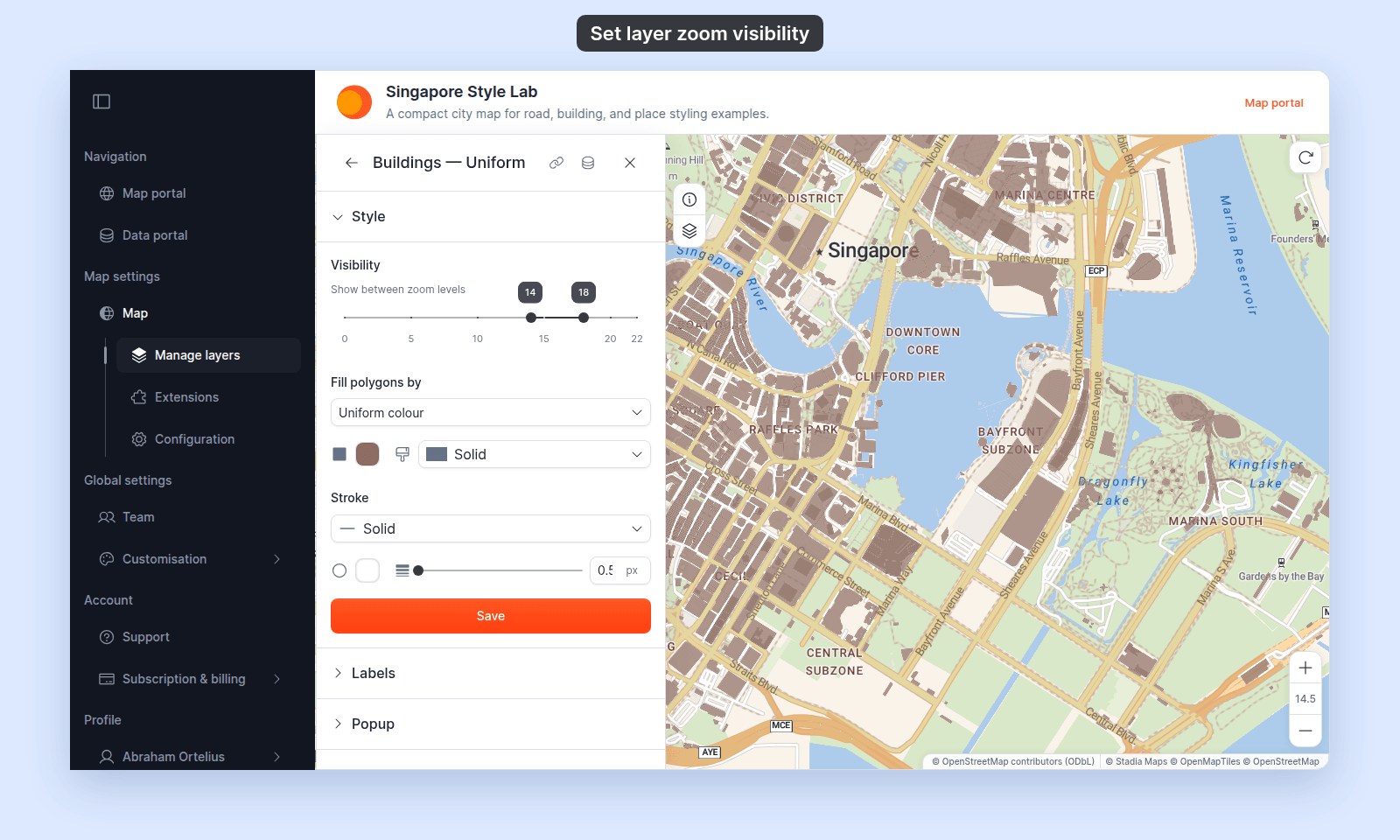
Open the layer's `Style` tab, set the `Visibility` slider, and click `Save` or `Save Style`. The layer shows at both ends of the range and stays hidden outside it. The same control works for every layer type — point, line, polygon, raster, WMS.
**[See it on an example map](https://mangomap-staging.com/examples-staging/maps/zlnhacsa/singapore-style-lab)**
Open the Singapore Style Lab. Zoom out a few levels. `Buildings — Uniform` hides below zoom 14. `Roads — Uniform` hides below zoom 11.
Use this to hide layers that only make sense at certain zoom levels — neighbourhood detail at zoom 14+, country-level summaries at zoom 5 and below, anything in between.
## Before you start
- You need edit access to the map.
- Some idea of the zoom range you want. Common ranges:
- **0–5** — country-and-region overviews. Country polygons, major rivers, capital cities.
- **6–10** — country-to-region detail. Major cities, main roads, large administrative boundaries.
- **11–14** — city-and-neighbourhood. Streets, parks, blocks, points of interest.
- **15–22** — building-and-feature detail. Building footprints, parcels, addresses.
## Open the Style tab
Click the layer in the layer panel to open its settings, then switch to the `Style` tab. The `Visibility` slider is at the top of the tab.
## Drag the slider
The control has the label `Visibility` and helper text `Show between zoom levels`. The slider is a two-handle range: drag the left handle for the minimum zoom and the right handle for the maximum.
The range includes both ends. With a range of `14` to `18`, the layer shows at zoom 14 and at zoom 18. It hides above zoom 18 and below zoom 14.
## Save
The slider doesn't take effect until you click the save button (`Save` for vector layers or `Save Style` for raster and WMS) at the end of the `Style` section.
If you close the layer settings or switch tabs before you save, your zoom-range change is lost — the same as any other style change.
## Verify the result
Zoom in and out past each end of the range to check the layer shows and hides.
The layer's [feature labels](/docs/styling-layers/show-feature-labels) follow the same range, and so does the legend.
## Tips for picking a range
- **Start broad, then narrow** — set a generous range first, see where the layer reads well, then tighten. Layers that look fine at a wide range usually don't need restriction.
- **Detail layers want a higher minimum** — building footprints, minor roads, and shop points rarely make sense below zoom 14. Restricting them stops the map slowing down at world-view zooms.
- **Summary layers want a lower maximum** — a country choropleth or a major-rivers layer doesn't need to draw at street-level zooms. Restrict it to keep the map clean.
- **Don't hide layers viewers expect to see** — if the layer is part of the map's purpose, change how it looks at different zooms instead of hiding it:
- **Point layers with `Circle` markers** can change marker size or colour by zoom. See [How to vary marker size by zoom level](/docs/styling-layers/vary-marker-size-by-zoom) and [How to change marker colour by zoom level](/docs/styling-layers/colour-markers-by-zoom).
- **Line and polygon layers** have no zoom styling. Use the `Duplicate Layer` action to make a second layer from the same dataset. Give each layer its own style. Start one layer's range at the zoom where the other's ends, such as `0`–`10` and `10`–`22`, so both layers draw only at zoom 10. With `0`–`10` and `11`–`22`, neither layer draws between zoom 10 and 11. See [Layer panel controls](/docs/managing-layers/layer-panel-reference).
The chart shows the common ranges above, and two layers made from one dataset with `Duplicate Layer`. A dot marks each end of a range, and the layer shows at both.
{/* diagram:layer-zoom-ranges */}
{/* /diagram:layer-zoom-ranges */}
The default range is the full `0–22`, meaning the layer is always visible.
## What this doesn't cover
- **Hiding the layer for the current session only** — that's the legend's eye icon, a per-session override that doesn't save. See [How the layer panel works in MangoMap](/docs/managing-layers/concepts-layer-panel) for the persistent vs. per-session distinction.
- **Hiding the layer from the legend** — see [How to hide a layer from the legend](/docs/managing-layers/hide-layer-from-legend).
- **Restricting the basemap to a zoom range** — basemap zoom is controlled by the basemap source, not by the Style tab.
- **Changing a layer's look with zoom** — zoom stops change a point layer's marker size or colour while the layer stays visible. They work on point layers with `Circle` markers only. See [How to vary marker size by zoom level](/docs/styling-layers/vary-marker-size-by-zoom) and [How to change marker colour by zoom level](/docs/styling-layers/colour-markers-by-zoom).
 ## Save
The slider doesn't take effect until you click the save button (`Save` for vector layers or `Save Style` for raster and WMS) at the end of the `Style` section.
If you close the layer settings or switch tabs before you save, your zoom-range change is lost — the same as any other style change.
## Verify the result
Zoom in and out past each end of the range to check the layer shows and hides.
The layer's [feature labels](/docs/styling-layers/show-feature-labels) follow the same range, and so does the legend.
## Tips for picking a range
- **Start broad, then narrow** — set a generous range first, see where the layer reads well, then tighten. Layers that look fine at a wide range usually don't need restriction.
- **Detail layers want a higher minimum** — building footprints, minor roads, and shop points rarely make sense below zoom 14. Restricting them stops the map slowing down at world-view zooms.
- **Summary layers want a lower maximum** — a country choropleth or a major-rivers layer doesn't need to draw at street-level zooms. Restrict it to keep the map clean.
- **Don't hide layers viewers expect to see** — if the layer is part of the map's purpose, change how it looks at different zooms instead of hiding it:
- **Point layers with `Circle` markers** can change marker size or colour by zoom. See [How to vary marker size by zoom level](/docs/styling-layers/vary-marker-size-by-zoom) and [How to change marker colour by zoom level](/docs/styling-layers/colour-markers-by-zoom).
- **Line and polygon layers** have no zoom styling. Use the `Duplicate Layer` action to make a second layer from the same dataset. Give each layer its own style. Start one layer's range at the zoom where the other's ends, such as `0`–`10` and `10`–`22`, so both layers draw only at zoom 10. With `0`–`10` and `11`–`22`, neither layer draws between zoom 10 and 11. See [Layer panel controls](/docs/managing-layers/layer-panel-reference).
The chart shows the common ranges above, and two layers made from one dataset with `Duplicate Layer`. A dot marks each end of a range, and the layer shows at both.
{/* diagram:layer-zoom-ranges */}
{/* /diagram:layer-zoom-ranges */}
The default range is the full `0–22`, meaning the layer is always visible.
## What this doesn't cover
- **Hiding the layer for the current session only** — that's the legend's eye icon, a per-session override that doesn't save. See [How the layer panel works in MangoMap](/docs/managing-layers/concepts-layer-panel) for the persistent vs. per-session distinction.
- **Hiding the layer from the legend** — see [How to hide a layer from the legend](/docs/managing-layers/hide-layer-from-legend).
- **Restricting the basemap to a zoom range** — basemap zoom is controlled by the basemap source, not by the Style tab.
- **Changing a layer's look with zoom** — zoom stops change a point layer's marker size or colour while the layer stays visible. They work on point layers with `Circle` markers only. See [How to vary marker size by zoom level](/docs/styling-layers/vary-marker-size-by-zoom) and [How to change marker colour by zoom level](/docs/styling-layers/colour-markers-by-zoom).
## Save
The slider doesn't take effect until you click the save button (`Save` for vector layers or `Save Style` for raster and WMS) at the end of the `Style` section.
If you close the layer settings or switch tabs before you save, your zoom-range change is lost — the same as any other style change.
## Verify the result
Zoom in and out past each end of the range to check the layer shows and hides.
The layer's [feature labels](/docs/styling-layers/show-feature-labels) follow the same range, and so does the legend.
## Tips for picking a range
- **Start broad, then narrow** — set a generous range first, see where the layer reads well, then tighten. Layers that look fine at a wide range usually don't need restriction.
- **Detail layers want a higher minimum** — building footprints, minor roads, and shop points rarely make sense below zoom 14. Restricting them stops the map slowing down at world-view zooms.
- **Summary layers want a lower maximum** — a country choropleth or a major-rivers layer doesn't need to draw at street-level zooms. Restrict it to keep the map clean.
- **Don't hide layers viewers expect to see** — if the layer is part of the map's purpose, change how it looks at different zooms instead of hiding it:
- **Point layers with `Circle` markers** can change marker size or colour by zoom. See [How to vary marker size by zoom level](/docs/styling-layers/vary-marker-size-by-zoom) and [How to change marker colour by zoom level](/docs/styling-layers/colour-markers-by-zoom).
- **Line and polygon layers** have no zoom styling. Use the `Duplicate Layer` action to make a second layer from the same dataset. Give each layer its own style. Start one layer's range at the zoom where the other's ends, such as `0`–`10` and `10`–`22`, so both layers draw only at zoom 10. With `0`–`10` and `11`–`22`, neither layer draws between zoom 10 and 11. See [Layer panel controls](/docs/managing-layers/layer-panel-reference).
The chart shows the common ranges above, and two layers made from one dataset with `Duplicate Layer`. A dot marks each end of a range, and the layer shows at both.
{/* diagram:layer-zoom-ranges */}
{/* /diagram:layer-zoom-ranges */}
The default range is the full `0–22`, meaning the layer is always visible.
## What this doesn't cover
- **Hiding the layer for the current session only** — that's the legend's eye icon, a per-session override that doesn't save. See [How the layer panel works in MangoMap](/docs/managing-layers/concepts-layer-panel) for the persistent vs. per-session distinction.
- **Hiding the layer from the legend** — see [How to hide a layer from the legend](/docs/managing-layers/hide-layer-from-legend).
- **Restricting the basemap to a zoom range** — basemap zoom is controlled by the basemap source, not by the Style tab.
- **Changing a layer's look with zoom** — zoom stops change a point layer's marker size or colour while the layer stays visible. They work on point layers with `Circle` markers only. See [How to vary marker size by zoom level](/docs/styling-layers/vary-marker-size-by-zoom) and [How to change marker colour by zoom level](/docs/styling-layers/colour-markers-by-zoom).