---
title: "Classification methods for by-quantity styling"
description: "What each method does when you colour a layer by a number: Equal Interval, Quantile, Natural Breaks (Jenks), and Head/Tail Breaks."
seo:
title: "Classification methods reference"
sidebar:
label: "Classification methods"
---
When you colour features by a numeric field and pick a class count in `Style as`, MangoMap offers four ways to split the values into class breaks: `Equal Interval`, `Quantile`, `Natural Breaks (Jenks)`, and the head/tail method. The method changes each feature's class and colour, even when the data stays the same.
**[See it on an example map](https://mangomap-staging.com/examples-staging/maps/1gayxa7f/world-classification-lab)**
Open the World Classification Lab. `Population — Equal Interval` is on when the map opens. Turn it off, then turn on one other layer at a time in `Population Classes`: `Population — Quantile`, `Population — Natural Breaks`, or `Population — Head/Tails`. Each layer colours the same countries with a different method.
The methods are the same on point, line, and polygon layers. Only one label differs:
| | Point | Line | Polygon |
| -------------------------- | ------------------------- | ------------------------- | ------------------------- |
| Colour driver | `Colour markers by` | `Colour lines by` | `Fill polygons by` |
| Head/tail method label | `Head/Tails` | `Head/Tail Breaks` | `Head/Tail Breaks` |
| Default method | `Natural Breaks (Jenks)` | `Natural Breaks (Jenks)` | `Natural Breaks (Jenks)` |
| Class counts | `3 classes` to `9 classes` | `3 classes` to `9 classes` | `3 classes` to `9 classes` |
To change a class break's boundary by hand, use `Customise Class Breaks` in the Style tab. For example, round `17.3` to `20`, or match a regulation threshold. The calculated class breaks are your starting point. See [How to customise category and class break symbology](/docs/styling-layers/customise-category-and-class-break-symbology).
For help choosing a method for your data and your viewers' question, see [Choosing a classification method for choropleth maps](/docs/styling-layers/concepts-choosing-classification-method).
## Equal Interval
| | |
| ------------- | ------------------------------------------------------------------------------------------------------------------ |
| Use when | The full range matters and you want every class to span the same numeric width. |
| Best for | Data where absolute differences mean something: rainfall in mm, elevation in metres, temperature. |
| Watch out for | Skewed data. A few large values can push most features into the lowest class and leave middle classes empty. |
`Equal Interval` divides `(max − min)` into N classes of equal width. For a field from 0 to 1,000 with 5 classes, the class breaks fall at 200, 400, 600, and 800.
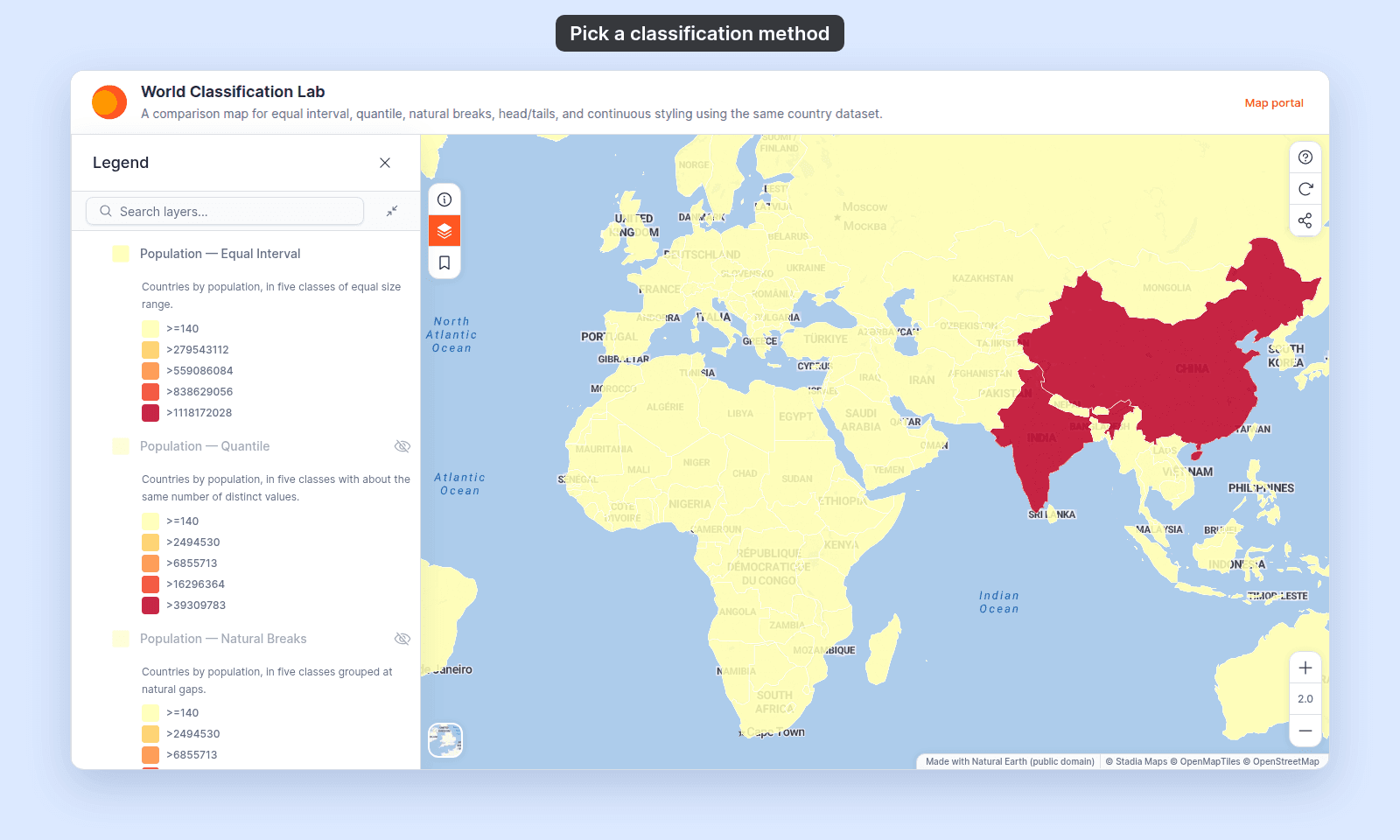
On world country populations, most countries fall in the lowest class:
## Quantile
| | |
| ------------- | -------------------------------------------------------------------------------------- |
| Use when | You want each class to hold about the same number of values. |
| Best for | Maps where every colour should cover a similar share of the features, to show rank. |
| Watch out for | Class boundaries fall at uneven numbers (for example 17.3 instead of 20). Many repeated values make the classes uneven. The field needs more distinct values than classes. |
`Quantile` sorts the field's distinct values and splits them into N groups of about the same size. Each value counts once, however many features share it. When most features have different values, such as population, each class holds about the same number of features. When many features share a value, such as a 1–5 rating, the counts per class can differ a lot.
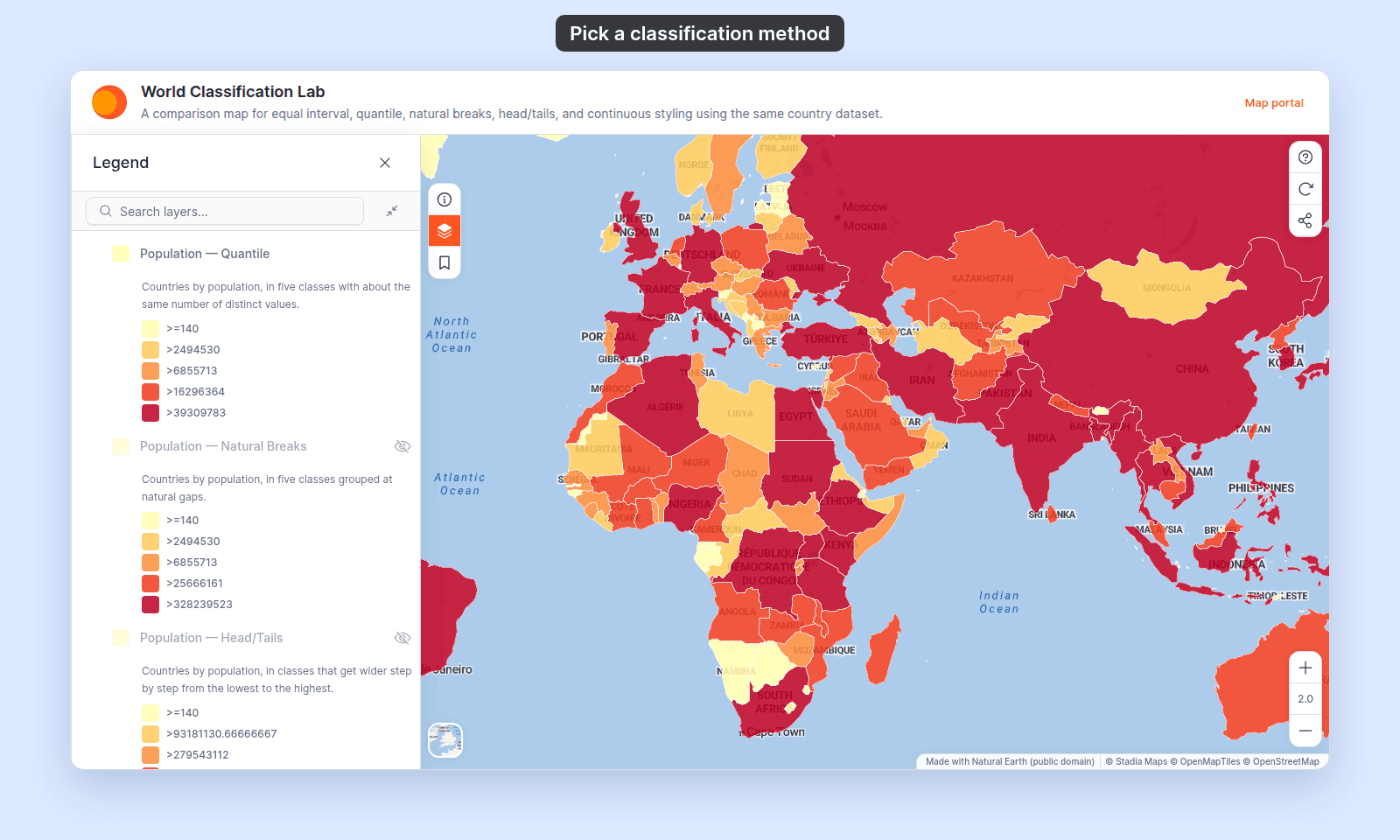
On world country populations, every colour covers a similar share of the countries:
## Natural Breaks (Jenks)
| | |
| ------------- | ----------------------------------------------------------------------------------------------------------------------------------------- |
| Use when | Your data has clear groups and you want the class breaks to fall at the gaps between them. |
| Best for | Data with several clusters of values, such as population, revenue, or building height. |
`Natural Breaks (Jenks)` uses the Jenks optimisation method. It looks for class breaks that keep the values inside each class close together and the classes far apart. The class breaks fall at "natural" gaps in the data.
Features with the same value are always in the same class. So you can't have more classes than the field has distinct values. If you pick more, MangoMap makes no class breaks and shows a message with the field name and the class count. For 9 classes on a field `lanes` with 7 distinct values:
```text
Failed to generate breaks: Error: Sorry, lanes doesn't have enough values to support 9 classbreaks. Please reduce the classbreaks.
```
`Quantile` shows the same message when the class count is equal to or more than the number of distinct values.
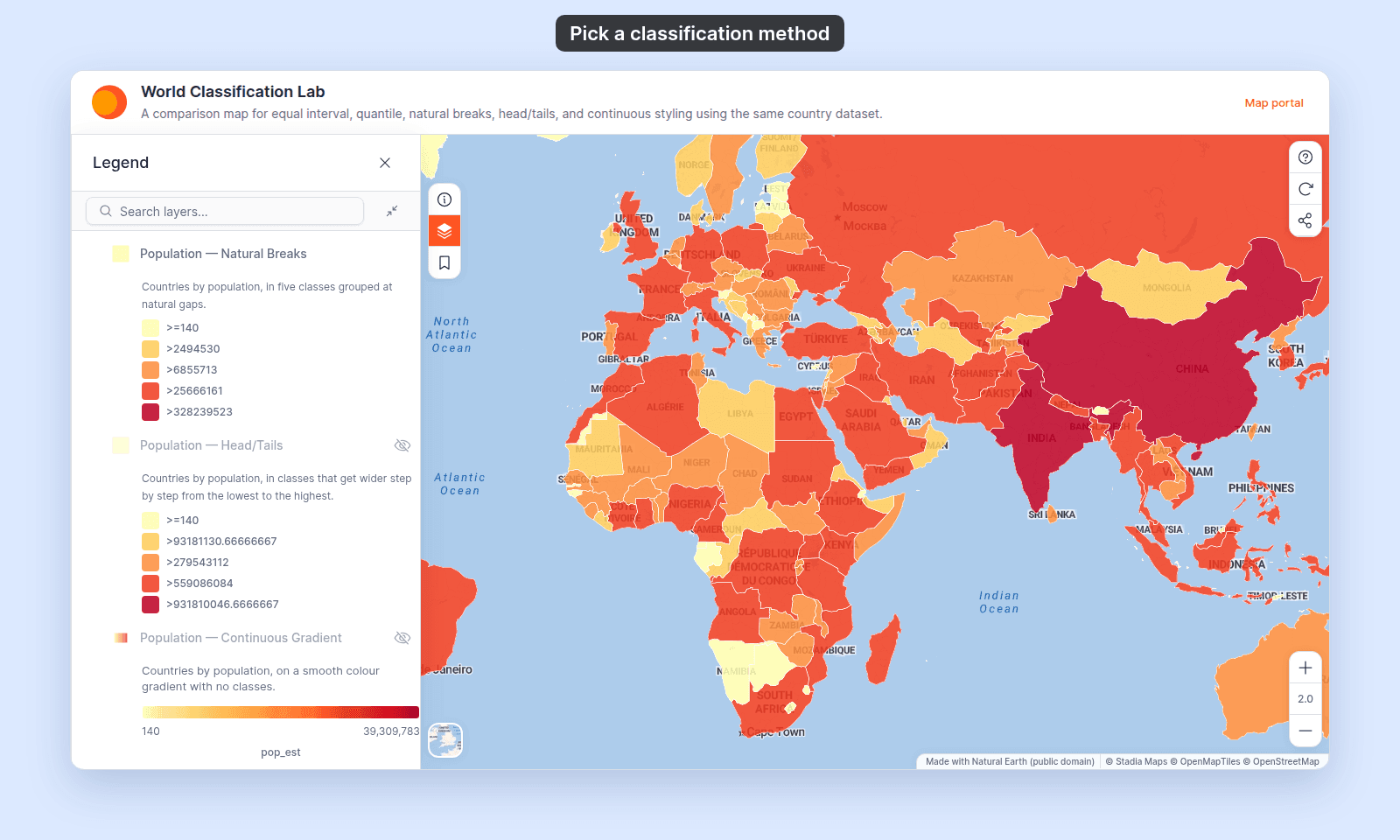
On world country populations, the top classes hold the most populous countries:
## Head/Tail Breaks
Point layers label this method `Head/Tails`. Line and polygon layers label it `Head/Tail Breaks`.
| | |
| ------------- | -------------------------------------------------------------------------------------------------------------------- |
| Use when | You want ranges tied to the number line, like `Equal Interval`, with more detail among the low values. |
| Best for | Data where values thin out steadily towards the top of the range. |
| Watch out for | On very skewed data, most features can still fall in the lowest class. |
The method divides `(max − min)` into classes that get wider from the lowest class to the highest. With N classes, the first class is 1 step wide, the second 2 steps, and so on up to N steps. For a field from 0 to 1,500 with 5 classes, a step is 100, so the class breaks fall at 100, 300, 600, and 1,000. You get the number of classes you choose.
On one scale, this example and the `Equal Interval` example show how the class widths differ:
{/* diagram:equal-interval-head-tail-strips */}
{/* /diagram:equal-interval-head-tail-strips */}
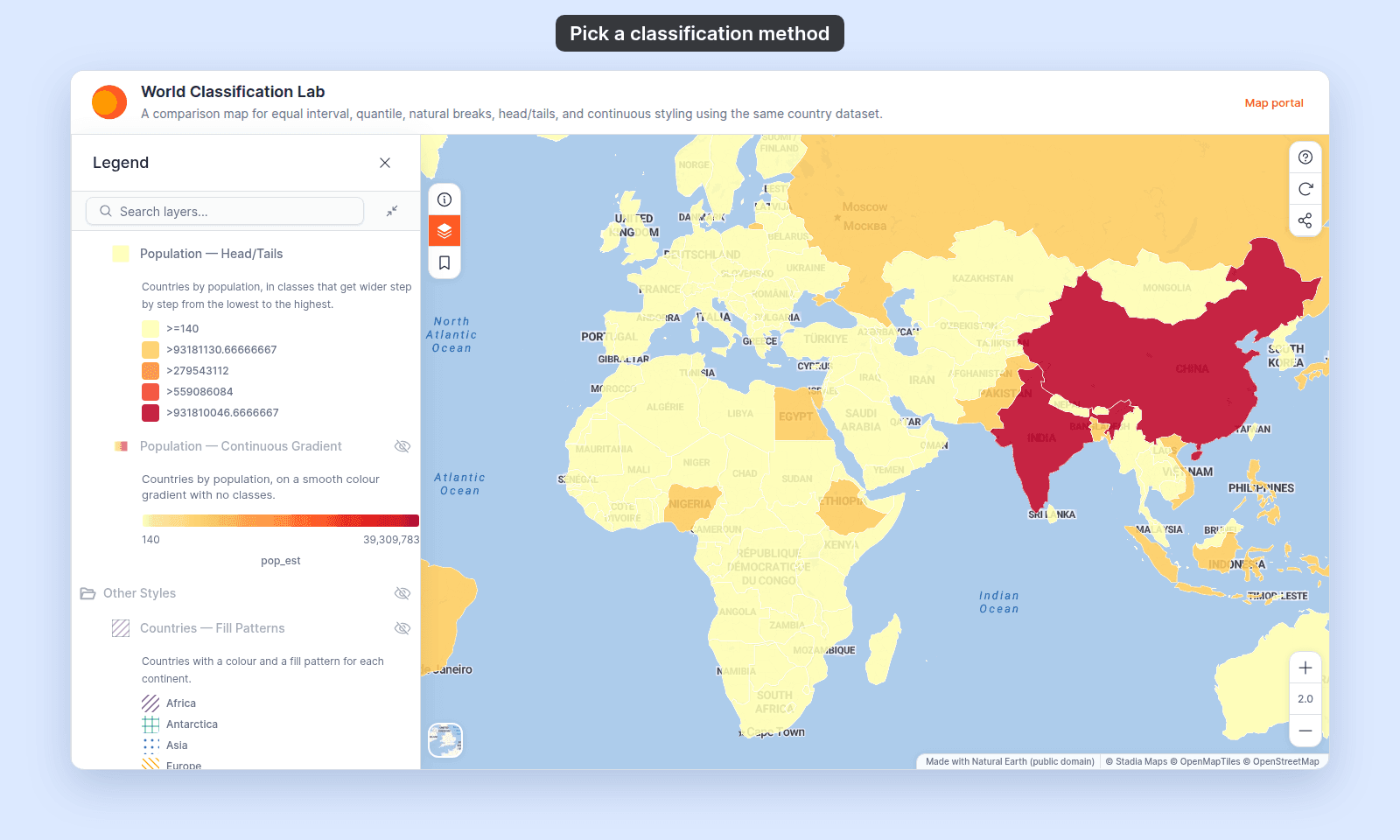
On world country populations, the lowest class is narrower than with `Equal Interval`, but it still holds most countries:
{/* TODO: product - MangoMap's head/tail method calls geostats getClassArithmeticProgression (apps/api/src/schemas/layer/functions/shared/analysis-sql.ts, generateClassbreaksWithGeoStats), not the recursive split at the mean that "head/tail breaks" usually means. This entry describes current behaviour. Update it if the product changes. */}
## Switching between methods
Changing the classification method rebuilds the class breaks from scratch. Changes you made to a class break's colour, range, or label are lost when the method, field, or class count changes. To keep custom values, choose the method first and customise last.
## Related
- [Choosing a classification method for choropleth maps](/docs/styling-layers/concepts-choosing-classification-method): the explanation that goes with this reference.
- [How to style features by quantity](/docs/styling-layers/style-by-quantity)
- [How to customise category and class break symbology](/docs/styling-layers/customise-category-and-class-break-symbology)
- [My classification produced empty buckets or weird breaks](/docs/styling-layers/troubleshoot-classification-empty-buckets)
- [Point layer style controls](/docs/styling-layers/point-style-reference)
- [Line layer style controls](/docs/styling-layers/line-style-reference)
- [Polygon layer style controls](/docs/styling-layers/polygon-style-reference)
- [How layer styling works in MangoMap](/docs/styling-layers/concepts-layer-styling)
 ## Quantile
| | |
| ------------- | -------------------------------------------------------------------------------------- |
| Use when | You want each class to hold about the same number of values. |
| Best for | Maps where every colour should cover a similar share of the features, to show rank. |
| Watch out for | Class boundaries fall at uneven numbers (for example 17.3 instead of 20). Many repeated values make the classes uneven. The field needs more distinct values than classes. |
`Quantile` sorts the field's distinct values and splits them into N groups of about the same size. Each value counts once, however many features share it. When most features have different values, such as population, each class holds about the same number of features. When many features share a value, such as a 1–5 rating, the counts per class can differ a lot.
On world country populations, every colour covers a similar share of the countries:
## Quantile
| | |
| ------------- | -------------------------------------------------------------------------------------- |
| Use when | You want each class to hold about the same number of values. |
| Best for | Maps where every colour should cover a similar share of the features, to show rank. |
| Watch out for | Class boundaries fall at uneven numbers (for example 17.3 instead of 20). Many repeated values make the classes uneven. The field needs more distinct values than classes. |
`Quantile` sorts the field's distinct values and splits them into N groups of about the same size. Each value counts once, however many features share it. When most features have different values, such as population, each class holds about the same number of features. When many features share a value, such as a 1–5 rating, the counts per class can differ a lot.
On world country populations, every colour covers a similar share of the countries:
 ## Natural Breaks (Jenks)
| | |
| ------------- | ----------------------------------------------------------------------------------------------------------------------------------------- |
| Use when | Your data has clear groups and you want the class breaks to fall at the gaps between them. |
| Best for | Data with several clusters of values, such as population, revenue, or building height. |
`Natural Breaks (Jenks)` uses the Jenks optimisation method. It looks for class breaks that keep the values inside each class close together and the classes far apart. The class breaks fall at "natural" gaps in the data.
Features with the same value are always in the same class. So you can't have more classes than the field has distinct values. If you pick more, MangoMap makes no class breaks and shows a message with the field name and the class count. For 9 classes on a field `lanes` with 7 distinct values:
```text
Failed to generate breaks: Error: Sorry, lanes doesn't have enough values to support 9 classbreaks. Please reduce the classbreaks.
```
`Quantile` shows the same message when the class count is equal to or more than the number of distinct values.
On world country populations, the top classes hold the most populous countries:
## Natural Breaks (Jenks)
| | |
| ------------- | ----------------------------------------------------------------------------------------------------------------------------------------- |
| Use when | Your data has clear groups and you want the class breaks to fall at the gaps between them. |
| Best for | Data with several clusters of values, such as population, revenue, or building height. |
`Natural Breaks (Jenks)` uses the Jenks optimisation method. It looks for class breaks that keep the values inside each class close together and the classes far apart. The class breaks fall at "natural" gaps in the data.
Features with the same value are always in the same class. So you can't have more classes than the field has distinct values. If you pick more, MangoMap makes no class breaks and shows a message with the field name and the class count. For 9 classes on a field `lanes` with 7 distinct values:
```text
Failed to generate breaks: Error: Sorry, lanes doesn't have enough values to support 9 classbreaks. Please reduce the classbreaks.
```
`Quantile` shows the same message when the class count is equal to or more than the number of distinct values.
On world country populations, the top classes hold the most populous countries:
 ## Head/Tail Breaks
Point layers label this method `Head/Tails`. Line and polygon layers label it `Head/Tail Breaks`.
| | |
| ------------- | -------------------------------------------------------------------------------------------------------------------- |
| Use when | You want ranges tied to the number line, like `Equal Interval`, with more detail among the low values. |
| Best for | Data where values thin out steadily towards the top of the range. |
| Watch out for | On very skewed data, most features can still fall in the lowest class. |
The method divides `(max − min)` into classes that get wider from the lowest class to the highest. With N classes, the first class is 1 step wide, the second 2 steps, and so on up to N steps. For a field from 0 to 1,500 with 5 classes, a step is 100, so the class breaks fall at 100, 300, 600, and 1,000. You get the number of classes you choose.
On one scale, this example and the `Equal Interval` example show how the class widths differ:
{/* diagram:equal-interval-head-tail-strips */}
{/* /diagram:equal-interval-head-tail-strips */}
On world country populations, the lowest class is narrower than with `Equal Interval`, but it still holds most countries:
## Head/Tail Breaks
Point layers label this method `Head/Tails`. Line and polygon layers label it `Head/Tail Breaks`.
| | |
| ------------- | -------------------------------------------------------------------------------------------------------------------- |
| Use when | You want ranges tied to the number line, like `Equal Interval`, with more detail among the low values. |
| Best for | Data where values thin out steadily towards the top of the range. |
| Watch out for | On very skewed data, most features can still fall in the lowest class. |
The method divides `(max − min)` into classes that get wider from the lowest class to the highest. With N classes, the first class is 1 step wide, the second 2 steps, and so on up to N steps. For a field from 0 to 1,500 with 5 classes, a step is 100, so the class breaks fall at 100, 300, 600, and 1,000. You get the number of classes you choose.
On one scale, this example and the `Equal Interval` example show how the class widths differ:
{/* diagram:equal-interval-head-tail-strips */}
{/* /diagram:equal-interval-head-tail-strips */}
On world country populations, the lowest class is narrower than with `Equal Interval`, but it still holds most countries:
 {/* TODO: product - MangoMap's head/tail method calls geostats getClassArithmeticProgression (apps/api/src/schemas/layer/functions/shared/analysis-sql.ts, generateClassbreaksWithGeoStats), not the recursive split at the mean that "head/tail breaks" usually means. This entry describes current behaviour. Update it if the product changes. */}
## Switching between methods
Changing the classification method rebuilds the class breaks from scratch. Changes you made to a class break's colour, range, or label are lost when the method, field, or class count changes. To keep custom values, choose the method first and customise last.
## Related
- [Choosing a classification method for choropleth maps](/docs/styling-layers/concepts-choosing-classification-method): the explanation that goes with this reference.
- [How to style features by quantity](/docs/styling-layers/style-by-quantity)
- [How to customise category and class break symbology](/docs/styling-layers/customise-category-and-class-break-symbology)
- [My classification produced empty buckets or weird breaks](/docs/styling-layers/troubleshoot-classification-empty-buckets)
- [Point layer style controls](/docs/styling-layers/point-style-reference)
- [Line layer style controls](/docs/styling-layers/line-style-reference)
- [Polygon layer style controls](/docs/styling-layers/polygon-style-reference)
- [How layer styling works in MangoMap](/docs/styling-layers/concepts-layer-styling)
{/* TODO: product - MangoMap's head/tail method calls geostats getClassArithmeticProgression (apps/api/src/schemas/layer/functions/shared/analysis-sql.ts, generateClassbreaksWithGeoStats), not the recursive split at the mean that "head/tail breaks" usually means. This entry describes current behaviour. Update it if the product changes. */}
## Switching between methods
Changing the classification method rebuilds the class breaks from scratch. Changes you made to a class break's colour, range, or label are lost when the method, field, or class count changes. To keep custom values, choose the method first and customise last.
## Related
- [Choosing a classification method for choropleth maps](/docs/styling-layers/concepts-choosing-classification-method): the explanation that goes with this reference.
- [How to style features by quantity](/docs/styling-layers/style-by-quantity)
- [How to customise category and class break symbology](/docs/styling-layers/customise-category-and-class-break-symbology)
- [My classification produced empty buckets or weird breaks](/docs/styling-layers/troubleshoot-classification-empty-buckets)
- [Point layer style controls](/docs/styling-layers/point-style-reference)
- [Line layer style controls](/docs/styling-layers/line-style-reference)
- [Polygon layer style controls](/docs/styling-layers/polygon-style-reference)
- [How layer styling works in MangoMap](/docs/styling-layers/concepts-layer-styling)