---
title: "How to delete a map"
description: "Delete a map from the Maps portal with the card menu. Layers, styles, and published links are removed, but datasets stay. You cannot undo it."
sidebar:
label: "Delete a map"
---
Deleting a map removes its configuration, including layers, styles, popups, extensions, access settings, and published links. The underlying datasets are not affected; they remain in your `Data` portal and any other maps that use them keep working. Deletion is permanent. You cannot recover the map or undo the action.
## Before you start
- You need the `Delete map` permission. This is available to the map's creator and to the account Owner. Admin, Editor, and Viewer roles cannot delete maps they did not create. See [Account roles reference](/docs/account-roles/account-roles-reference).
- Any links published to the map will stop working. If the map is `Public`, embedded in a website, or shared via a `Link-only` URL, those URLs will return an error after deletion.
- Confirm that deletion is what you want. Alternatives:
- To hide a map from the portal without deleting it, turn off `Show in public portal` in the map's access settings. See [Map access](/docs/map-access).
- To make a public map private, change `Publishing mode` in the map's access settings.
If you cannot delete a map, the `…` menu doesn't appear on its card.
## Open the map card menu
Find the map you want to delete. Hover over its card (or its row in list view) and click the `…` button in the top-right corner of the thumbnail.
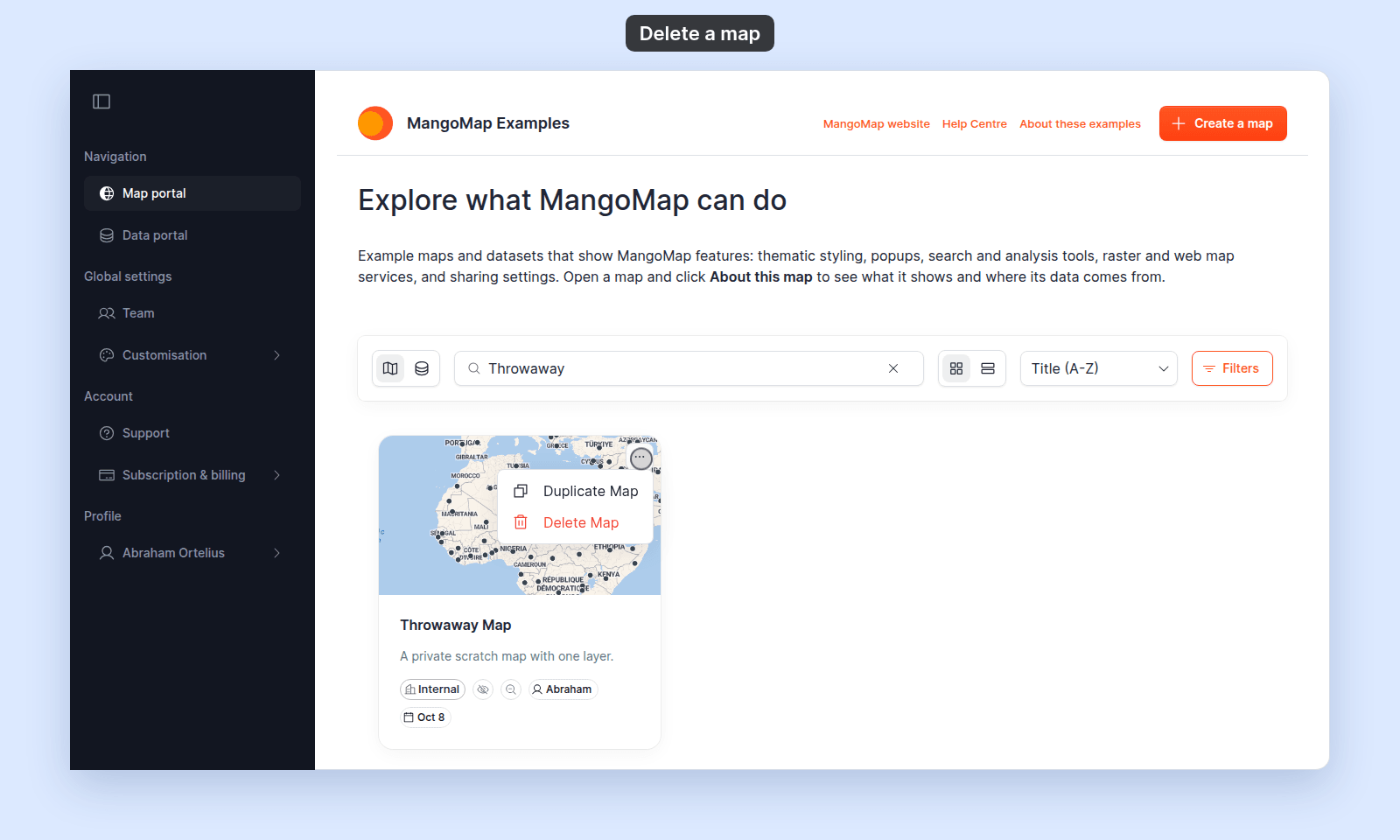 The menu opens. `Delete Map` is the second item, in red, with a trash icon.
## Click Delete Map
The menu opens. `Delete Map` is the second item, in red, with a trash icon.
## Click Delete Map
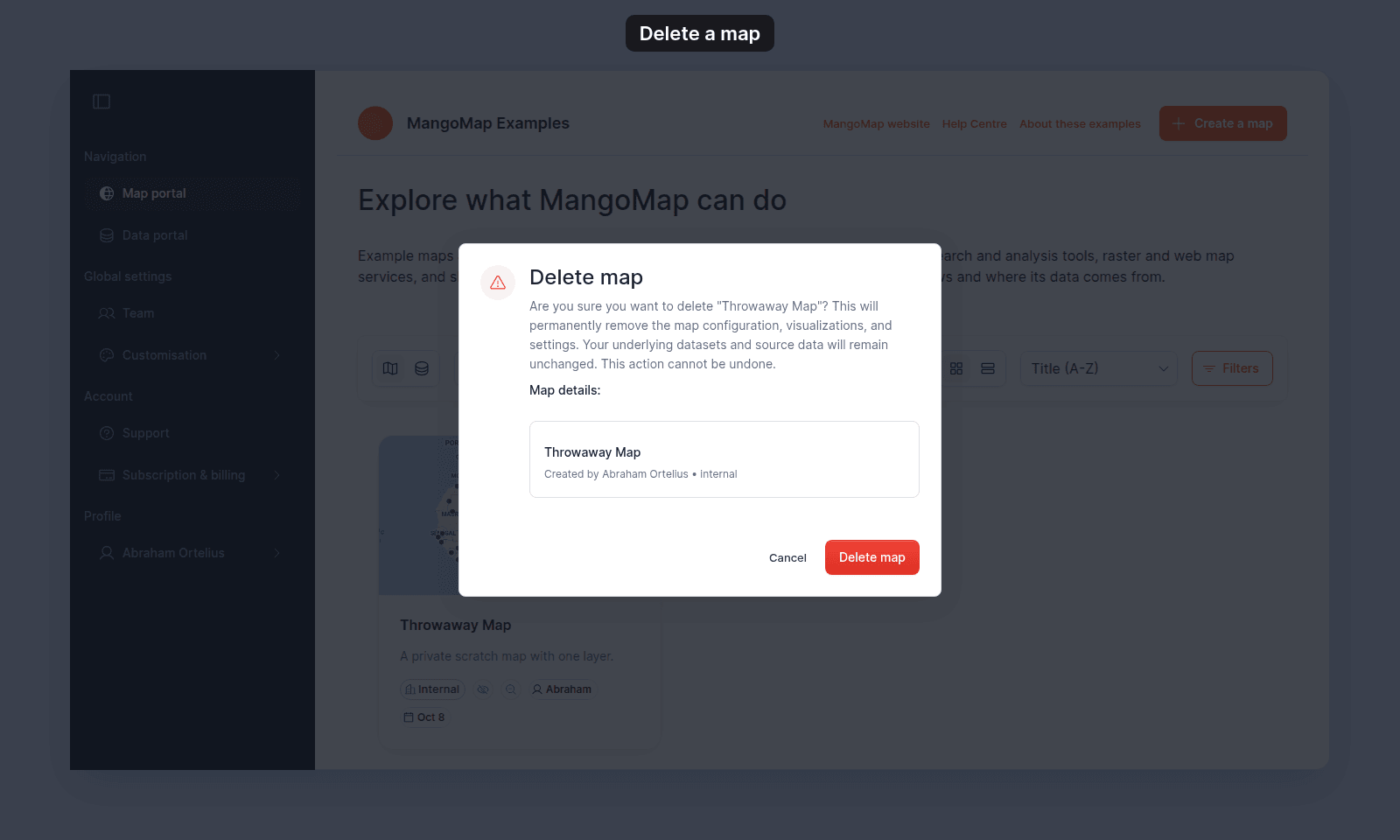 The portal opens a `Delete map` confirmation dialog showing:
- A heading — `Delete map`.
- A body paragraph confirming that the map configuration will be permanently removed, that the underlying datasets are unaffected, and that the action cannot be undone.
- A `Map details:` summary with the map's title, creator, and access mode.
- Two buttons — `Cancel` and `Delete map` (red).
> [!WARNING]
> Deleting a map breaks every link to it: public, link-only, password, and embedded. You cannot undo it.
Click `Delete map` to confirm. The portal removes the map and the card disappears from the list.
Click `Cancel`, press `Escape`, or click outside the dialog to abandon the action.
## What's deleted, and what isn't
| Removed permanently | Unaffected |
| ----------------------------------------- | --------------------------------------------------- |
| The map's configuration and settings | The datasets the map's layers pointed to |
| Layer order, grouping, styles, popups | The dataset's records, schema, and access settings |
| Map extensions and their per-map settings | Other maps in the account, including duplicates |
| Per-map navigation menus and layout | Account-wide customisation (branding, custom domain)|
| Public, link-only, or password URLs | |
If a layer used a dataset, that dataset survives. To remove the dataset too, delete it from the [`Data` portal](/docs/portals/data-portal-reference#delete-flow).
## Related
- [Maps portal reference](/docs/portals/maps-portal-reference) — the full set of map card controls.
- [How to duplicate a map](/docs/portals/duplicate-a-map) — the parallel action on the same menu.
- [How map access works in MangoMap](/docs/map-access/concepts-map-access) — alternative to deletion: hide from portal, change mode.
- [How to delete a dataset](/docs/portals/delete-a-dataset) — the parallel destructive action on the Data page.
- [Account roles reference](/docs/account-roles/account-roles-reference) — who can delete.
The portal opens a `Delete map` confirmation dialog showing:
- A heading — `Delete map`.
- A body paragraph confirming that the map configuration will be permanently removed, that the underlying datasets are unaffected, and that the action cannot be undone.
- A `Map details:` summary with the map's title, creator, and access mode.
- Two buttons — `Cancel` and `Delete map` (red).
> [!WARNING]
> Deleting a map breaks every link to it: public, link-only, password, and embedded. You cannot undo it.
Click `Delete map` to confirm. The portal removes the map and the card disappears from the list.
Click `Cancel`, press `Escape`, or click outside the dialog to abandon the action.
## What's deleted, and what isn't
| Removed permanently | Unaffected |
| ----------------------------------------- | --------------------------------------------------- |
| The map's configuration and settings | The datasets the map's layers pointed to |
| Layer order, grouping, styles, popups | The dataset's records, schema, and access settings |
| Map extensions and their per-map settings | Other maps in the account, including duplicates |
| Per-map navigation menus and layout | Account-wide customisation (branding, custom domain)|
| Public, link-only, or password URLs | |
If a layer used a dataset, that dataset survives. To remove the dataset too, delete it from the [`Data` portal](/docs/portals/data-portal-reference#delete-flow).
## Related
- [Maps portal reference](/docs/portals/maps-portal-reference) — the full set of map card controls.
- [How to duplicate a map](/docs/portals/duplicate-a-map) — the parallel action on the same menu.
- [How map access works in MangoMap](/docs/map-access/concepts-map-access) — alternative to deletion: hide from portal, change mode.
- [How to delete a dataset](/docs/portals/delete-a-dataset) — the parallel destructive action on the Data page.
- [Account roles reference](/docs/account-roles/account-roles-reference) — who can delete.