---
title: "Users page"
description: "Look up the controls on the Users page: the Invite user and Add group buttons, the Users and Access Groups tabs, table columns, row actions, and states."
---
Enterprise and Agency only
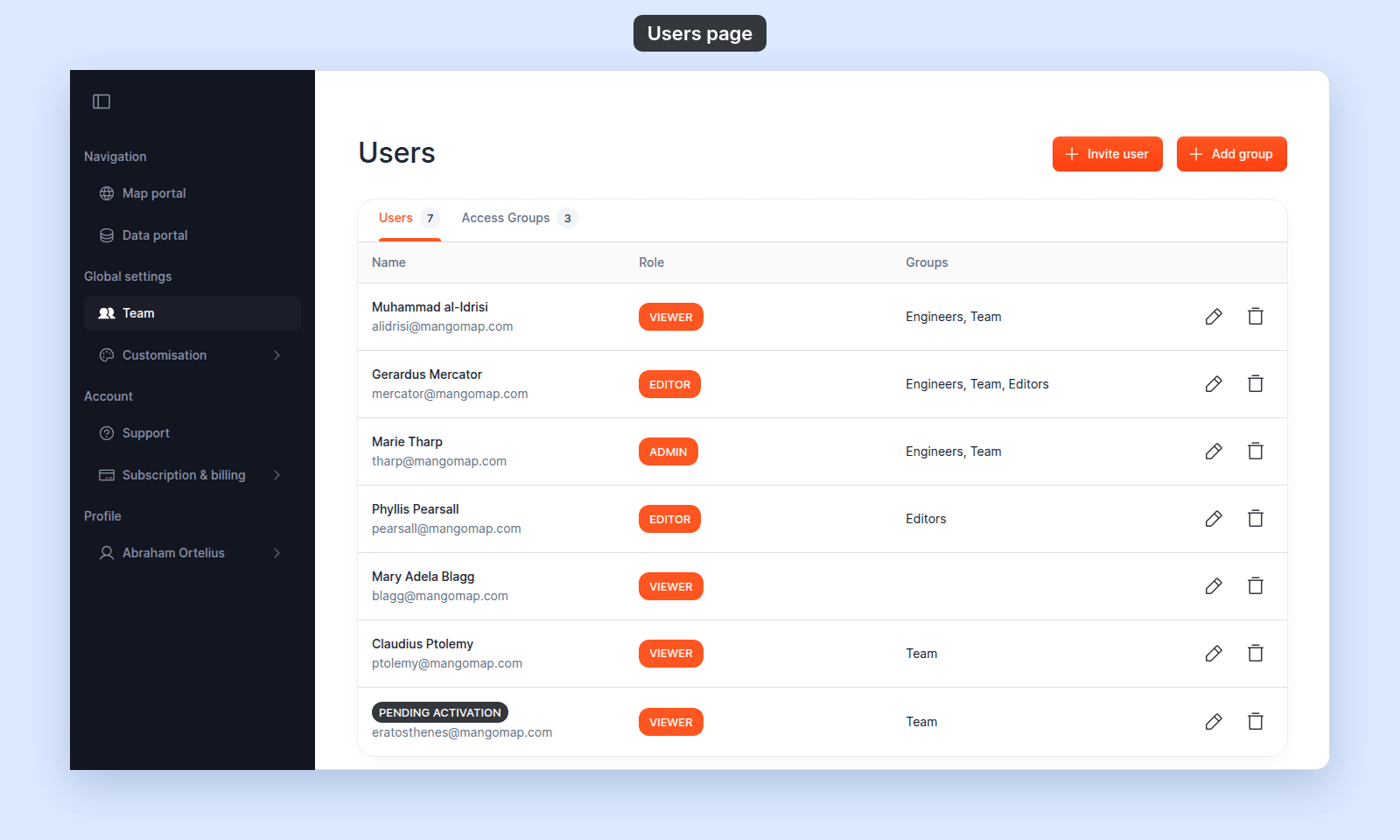
The account owner uses the `Users` page to manage users and access groups. Use this reference to check each control before you invite, change, or delete a user.
## Where this page is
| | |
| --- | --- |
| Navigation | `Global settings` > `Team` |
| Page title | `Users` |
| Tabs | `Users`, `Access Groups`. Each tab shows its count. |
| Action bar | `Invite user`, `Add group` |
| Required role | `Owner`. `Admin`, `Editor`, and `Viewer` users do not see `Team` in the navigation, and MangoMap sends them to the `Map portal` if they open the route. |
 ## Action bar
| Button | Effect |
| --- | --- |
| `Invite user` | Opens the [`Invite user` form](/docs/managing-team/invite-a-user). |
| `Add group` | Opens the [`Create group` form](/docs/managing-team/create-an-access-group). |
The buttons appear on both tabs.
## Users tab
| Column | What it shows |
| --- | --- |
| Name | The user's name and email on two lines. While the user is unactivated, the name is replaced with a `PENDING ACTIVATION` chip and only the email is visible. |
| Role | The user's account role, shown as a chip: `ADMIN`, `EDITOR`, or `VIEWER`. |
| Groups | The names of every access group the user is in, comma-separated. |
| _(actions)_ | Edit (pencil) and Delete (trash) icons, right-aligned. |
The table does not list the account owner.
Empty state: `No users found`.
### Row actions
| Action | Where it goes | When it appears |
| --- | --- | --- |
| Edit (pencil) | [`Update user`](/docs/managing-team/update-a-user). | Always. |
| Delete (trash) | Opens the `Permanently delete this user?` dialog. | Always. The owner has no row, so the owner cannot be deleted. |
### Delete user dialog
| Field | Value |
| --- | --- |
| Title | `Permanently delete this user?` |
| Body | `This user's access will be immediately revoked.` |
| Confirm | `Permanently delete` |
| Cancel | `Cancel` |
Deletion happens at once and cannot be undone in the UI.
## Access Groups tab
| Column | What it shows |
| --- | --- |
| Name | The group's name. |
| Members | The number of members in the group. |
| _(actions)_ | Edit (pencil) and Delete (trash) icons, right-aligned. |
Empty state: `No groups found`.
### Row actions
| Action | Where it goes |
| --- | --- |
| Edit (pencil) | [`Edit group`](/docs/managing-team/edit-an-access-group). |
| Delete (trash) | Opens the `Permanently delete this access group?` dialog. |
### Delete group dialog
| Field | Value |
| --- | --- |
| Title | `Permanently delete this access group?` |
| Body | `All access granted by this group will be immediately revoked.` |
| Confirm | `Permanently delete` |
| Cancel | `Cancel` |
Deleting a group revokes every `View` and `Edit` permission that group granted across every map and dataset, in one step.
## Invite user form
| Section | Field | Choices / details |
| --- | --- | --- |
| `User information` | `Email address` | Free text. Must be a valid email. |
| `User information` | _(role)_ | `Admin`, `Editor`, and `Viewer` (radio). `Owner` is not offered. |
| `Groups` | _(group selection)_ | Checkbox table of every access group with a `Select all` column header. |
Submit button: `Invite user`. Cancel: `Cancel`. Empty group table: `No groups found`.
The invite is rejected if the role's seat limit is reached. Team management and access groups require an Enterprise or Agency plan.
## Update user form
| Section | Field | Choices / details |
| --- | --- | --- |
| `User information` | `Name` | Free text. Optional. |
| `User information` | `Email address` | Free text. Required. Must be a valid email. |
| `User information` | _(role)_ | `Admin`, `Editor`, and `Viewer` (radio). `Owner` is not offered. |
| `Groups` | _(group selection)_ | Same checkbox table as on the invite form. |
Submit button: `Update user`. Cancel: `Cancel`.
The forms offer `Admin`, `Editor`, and `Viewer`; they do not offer `Owner`.
## Create group form
| Section | Field | Choices / details |
| --- | --- | --- |
| `Group information` | `Name` | Free text. Required. |
| `Members information` | _(member selection)_ | Checkbox table of every account user. The header column is `Select all`. The second column is `Role`. |
Submit button: `Create group`. Cancel: `Cancel`. Empty users table: `No users found`.
The owner's row is pre-selected and disabled. Rows for unactivated (`PENDING ACTIVATION`) users can be selected like any other row.
## Edit group form
Same fields as the create form, with title `Edit group`, submit `Save changes`, and empty state `No members found`.
## Status chip
| Chip | Meaning |
| --- | --- |
| `PENDING ACTIVATION` | The user has been invited but has not completed `Join`. They cannot sign in yet. You can still edit them, remove them, and add them to groups. |
Once a user activates, the chip is replaced with their name.
## Related
- [How team management and account roles work in MangoMap](/docs/managing-team/concepts-team-and-roles)
- [Account roles reference](/docs/account-roles/account-roles-reference) - the canonical "who can do what" matrix across every surface.
- [How to invite a user](/docs/managing-team/invite-a-user)
- [How to update a user](/docs/managing-team/update-a-user)
- [How to remove a user](/docs/managing-team/remove-a-user)
- [How to create an access group](/docs/managing-team/create-an-access-group)
- [How to edit an access group](/docs/managing-team/edit-an-access-group)
- [How to delete an access group](/docs/managing-team/delete-an-access-group)
---
## Action bar
| Button | Effect |
| --- | --- |
| `Invite user` | Opens the [`Invite user` form](/docs/managing-team/invite-a-user). |
| `Add group` | Opens the [`Create group` form](/docs/managing-team/create-an-access-group). |
The buttons appear on both tabs.
## Users tab
| Column | What it shows |
| --- | --- |
| Name | The user's name and email on two lines. While the user is unactivated, the name is replaced with a `PENDING ACTIVATION` chip and only the email is visible. |
| Role | The user's account role, shown as a chip: `ADMIN`, `EDITOR`, or `VIEWER`. |
| Groups | The names of every access group the user is in, comma-separated. |
| _(actions)_ | Edit (pencil) and Delete (trash) icons, right-aligned. |
The table does not list the account owner.
Empty state: `No users found`.
### Row actions
| Action | Where it goes | When it appears |
| --- | --- | --- |
| Edit (pencil) | [`Update user`](/docs/managing-team/update-a-user). | Always. |
| Delete (trash) | Opens the `Permanently delete this user?` dialog. | Always. The owner has no row, so the owner cannot be deleted. |
### Delete user dialog
| Field | Value |
| --- | --- |
| Title | `Permanently delete this user?` |
| Body | `This user's access will be immediately revoked.` |
| Confirm | `Permanently delete` |
| Cancel | `Cancel` |
Deletion happens at once and cannot be undone in the UI.
## Access Groups tab
| Column | What it shows |
| --- | --- |
| Name | The group's name. |
| Members | The number of members in the group. |
| _(actions)_ | Edit (pencil) and Delete (trash) icons, right-aligned. |
Empty state: `No groups found`.
### Row actions
| Action | Where it goes |
| --- | --- |
| Edit (pencil) | [`Edit group`](/docs/managing-team/edit-an-access-group). |
| Delete (trash) | Opens the `Permanently delete this access group?` dialog. |
### Delete group dialog
| Field | Value |
| --- | --- |
| Title | `Permanently delete this access group?` |
| Body | `All access granted by this group will be immediately revoked.` |
| Confirm | `Permanently delete` |
| Cancel | `Cancel` |
Deleting a group revokes every `View` and `Edit` permission that group granted across every map and dataset, in one step.
## Invite user form
| Section | Field | Choices / details |
| --- | --- | --- |
| `User information` | `Email address` | Free text. Must be a valid email. |
| `User information` | _(role)_ | `Admin`, `Editor`, and `Viewer` (radio). `Owner` is not offered. |
| `Groups` | _(group selection)_ | Checkbox table of every access group with a `Select all` column header. |
Submit button: `Invite user`. Cancel: `Cancel`. Empty group table: `No groups found`.
The invite is rejected if the role's seat limit is reached. Team management and access groups require an Enterprise or Agency plan.
## Update user form
| Section | Field | Choices / details |
| --- | --- | --- |
| `User information` | `Name` | Free text. Optional. |
| `User information` | `Email address` | Free text. Required. Must be a valid email. |
| `User information` | _(role)_ | `Admin`, `Editor`, and `Viewer` (radio). `Owner` is not offered. |
| `Groups` | _(group selection)_ | Same checkbox table as on the invite form. |
Submit button: `Update user`. Cancel: `Cancel`.
The forms offer `Admin`, `Editor`, and `Viewer`; they do not offer `Owner`.
## Create group form
| Section | Field | Choices / details |
| --- | --- | --- |
| `Group information` | `Name` | Free text. Required. |
| `Members information` | _(member selection)_ | Checkbox table of every account user. The header column is `Select all`. The second column is `Role`. |
Submit button: `Create group`. Cancel: `Cancel`. Empty users table: `No users found`.
The owner's row is pre-selected and disabled. Rows for unactivated (`PENDING ACTIVATION`) users can be selected like any other row.
## Edit group form
Same fields as the create form, with title `Edit group`, submit `Save changes`, and empty state `No members found`.
## Status chip
| Chip | Meaning |
| --- | --- |
| `PENDING ACTIVATION` | The user has been invited but has not completed `Join`. They cannot sign in yet. You can still edit them, remove them, and add them to groups. |
Once a user activates, the chip is replaced with their name.
## Related
- [How team management and account roles work in MangoMap](/docs/managing-team/concepts-team-and-roles)
- [Account roles reference](/docs/account-roles/account-roles-reference) - the canonical "who can do what" matrix across every surface.
- [How to invite a user](/docs/managing-team/invite-a-user)
- [How to update a user](/docs/managing-team/update-a-user)
- [How to remove a user](/docs/managing-team/remove-a-user)
- [How to create an access group](/docs/managing-team/create-an-access-group)
- [How to edit an access group](/docs/managing-team/edit-an-access-group)
- [How to delete an access group](/docs/managing-team/delete-an-access-group)
---