---
title: "How to delete an access group"
description: "Permanently delete an access group from the Access Groups tab. The group's View and Edit access on every map and dataset ends at once, and you cannot undo it."
sidebar:
label: "Delete an access group"
---
Enterprise and Agency only
Deleting an access group revokes every `View` and `Edit` permission it granted on every map and dataset. Use it when you no longer need the group. If you only want to revoke access on one map or dataset, edit that item's access settings instead.
## Before you start
- You need to be the account owner. Only the user with the `Owner` role can delete groups.
- The action starts at once and the UI cannot undo it.
- Audit which maps and datasets the group has `View` or `Edit` on before deleting. Members lose that access the moment you confirm.
- If your goal is narrower — for example, removing access on one map but keeping the group — open that map's `Access` settings and turn off the group's switches there instead. See [How to share a map with groups](/docs/map-access/share-map-with-groups) and [How to share a dataset with groups](/docs/dataset-access/share-dataset-with-groups).
## Open the Access Groups tab
In the navigation, under `Global settings`, click `Team`, then click the `Access Groups` tab.
## Delete the group
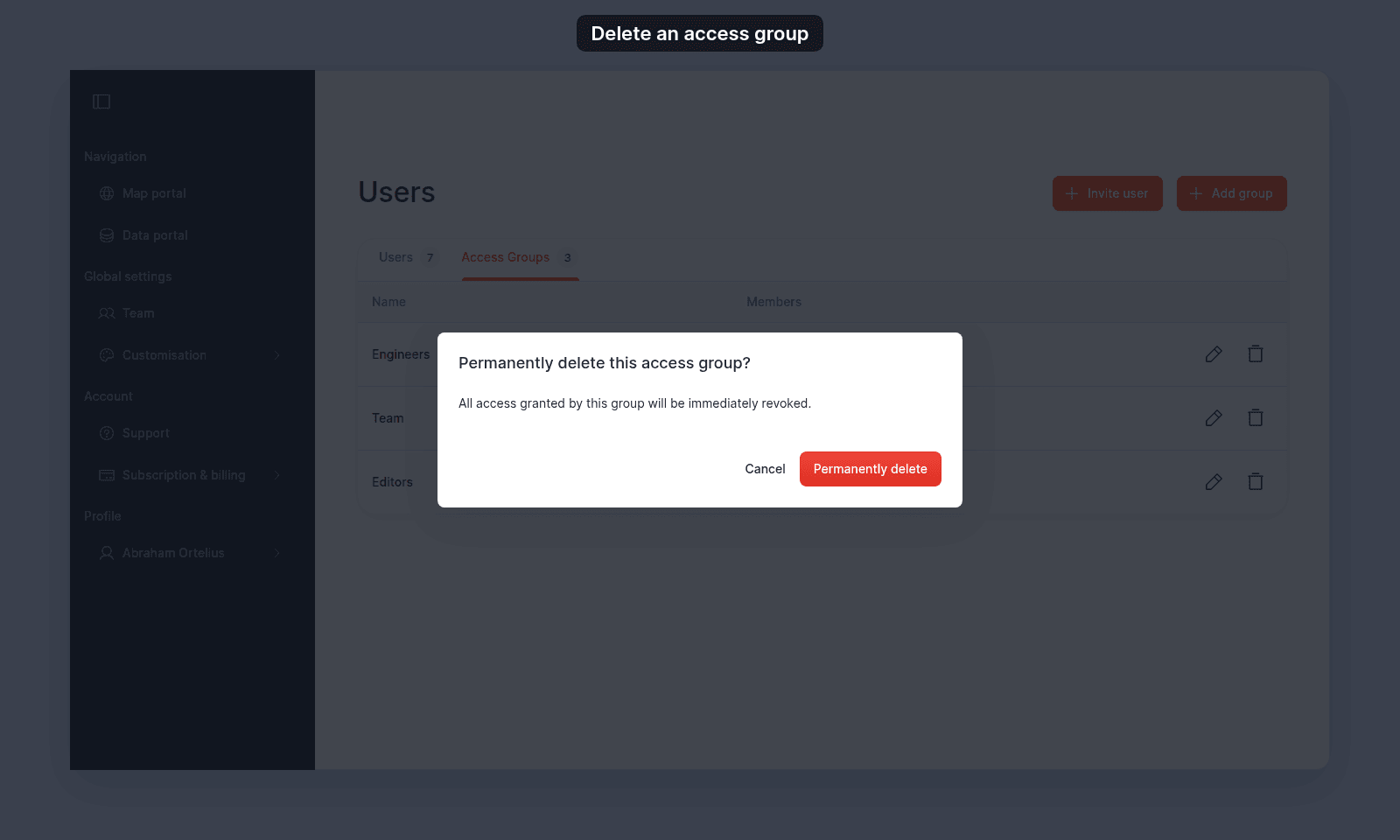
On the group's row, click the trash icon at the right edge. A confirmation dialog opens:
 > [!WARNING]
> The dialog does not name the group, so check the row before you confirm.
Click `Permanently delete` to confirm. The group disappears from the table.
To back out, click `Cancel`. Nothing changes.
## What happens after deletion
- Every `View` and `Edit` toggle the group had set on every map and every dataset is revoked. Members who were getting access through this group lose that access.
- Members who are also in another group with overlapping access keep that access through the other group. Permissions add up across groups.
- The group's name disappears from `Share with team` (on maps) and `Internal Access` (on datasets) wherever it appeared.
- Account users themselves are not deleted. Only their membership in this group ends.
- Maps and datasets owned by group members are not affected.
## Troubleshooting
**The Access Groups tab is blocked.** You are not the account owner. See [The Users or Groups page is blocked](/docs/managing-team/troubleshoot-team-page-access).
**You deleted the wrong group.** Re-create the group with [How to create an access group](/docs/managing-team/create-an-access-group), pick its members again, and re-grant `View` or `Edit` on each map and dataset that needs it.
**A user still has access after the group was deleted.** They are in another group that grants the same access, or they are the dataset/map creator, or they are the account owner. Open the relevant map or dataset's `Access` settings to see which group is granting the access.
## Related
- [How to create an access group](/docs/managing-team/create-an-access-group)
- [How to edit an access group](/docs/managing-team/edit-an-access-group)
- [How to share a map with groups](/docs/map-access/share-map-with-groups)
- [How to share a dataset with groups](/docs/dataset-access/share-dataset-with-groups)
- [Users page](/docs/managing-team/users-page-reference)
> [!WARNING]
> The dialog does not name the group, so check the row before you confirm.
Click `Permanently delete` to confirm. The group disappears from the table.
To back out, click `Cancel`. Nothing changes.
## What happens after deletion
- Every `View` and `Edit` toggle the group had set on every map and every dataset is revoked. Members who were getting access through this group lose that access.
- Members who are also in another group with overlapping access keep that access through the other group. Permissions add up across groups.
- The group's name disappears from `Share with team` (on maps) and `Internal Access` (on datasets) wherever it appeared.
- Account users themselves are not deleted. Only their membership in this group ends.
- Maps and datasets owned by group members are not affected.
## Troubleshooting
**The Access Groups tab is blocked.** You are not the account owner. See [The Users or Groups page is blocked](/docs/managing-team/troubleshoot-team-page-access).
**You deleted the wrong group.** Re-create the group with [How to create an access group](/docs/managing-team/create-an-access-group), pick its members again, and re-grant `View` or `Edit` on each map and dataset that needs it.
**A user still has access after the group was deleted.** They are in another group that grants the same access, or they are the dataset/map creator, or they are the account owner. Open the relevant map or dataset's `Access` settings to see which group is granting the access.
## Related
- [How to create an access group](/docs/managing-team/create-an-access-group)
- [How to edit an access group](/docs/managing-team/edit-an-access-group)
- [How to share a map with groups](/docs/map-access/share-map-with-groups)
- [How to share a dataset with groups](/docs/dataset-access/share-dataset-with-groups)
- [Users page](/docs/managing-team/users-page-reference)