---
title: "How to edit a feature's geometry"
description: "Move a point, reshape a line or polygon, or remove a vertex. Saving changes the dataset on every map that uses it."
sidebar:
label: "Edit a feature's geometry"
---
Use `Edit geometry` to move a point or reshape a line or polygon. Saving changes the source dataset and every map that uses it.
{/* video-content: id=edit-feature-geometry
Start: A fully loaded map zoomed to one polygon feature, with that feature's
popup open.
Show:
1. Open the popup's three-dot menu and click Edit geometry. The editor opens on
the right and vertex handles appear on the polygon.
2. Drag one corner vertex to a new position. The polygon reshapes.
3. Click the midpoint between two corners. A new vertex appears there.
4. Right-click a different corner vertex. That vertex is removed and the polygon
reshapes.
5. Click Cancel. The handles disappear and the polygon returns to its original
shape.
End: The polygon in its original shape, with no editing handles.
Exclude: Authentication, loading screens, fixture setup, Save changes, any
change saved to the dataset, multi-part geometry, and the map context menu.
*/}
{/* walkthrough: id=edit-feature-geometry */}
{/* /walkthrough */}
## Before you start
- Sign in with permission to edit features in the dataset.
- Use a vector layer with an enabled popup.
- Confirm that the dataset-wide geometry change is intended.
## Open the geometry editor
1. Select the feature on the map.
2. Open the popup's three-dot menu.
3. Click `Edit geometry`.
The editor opens on the right, and handles appear on the feature on the map.
## Move or reshape the feature
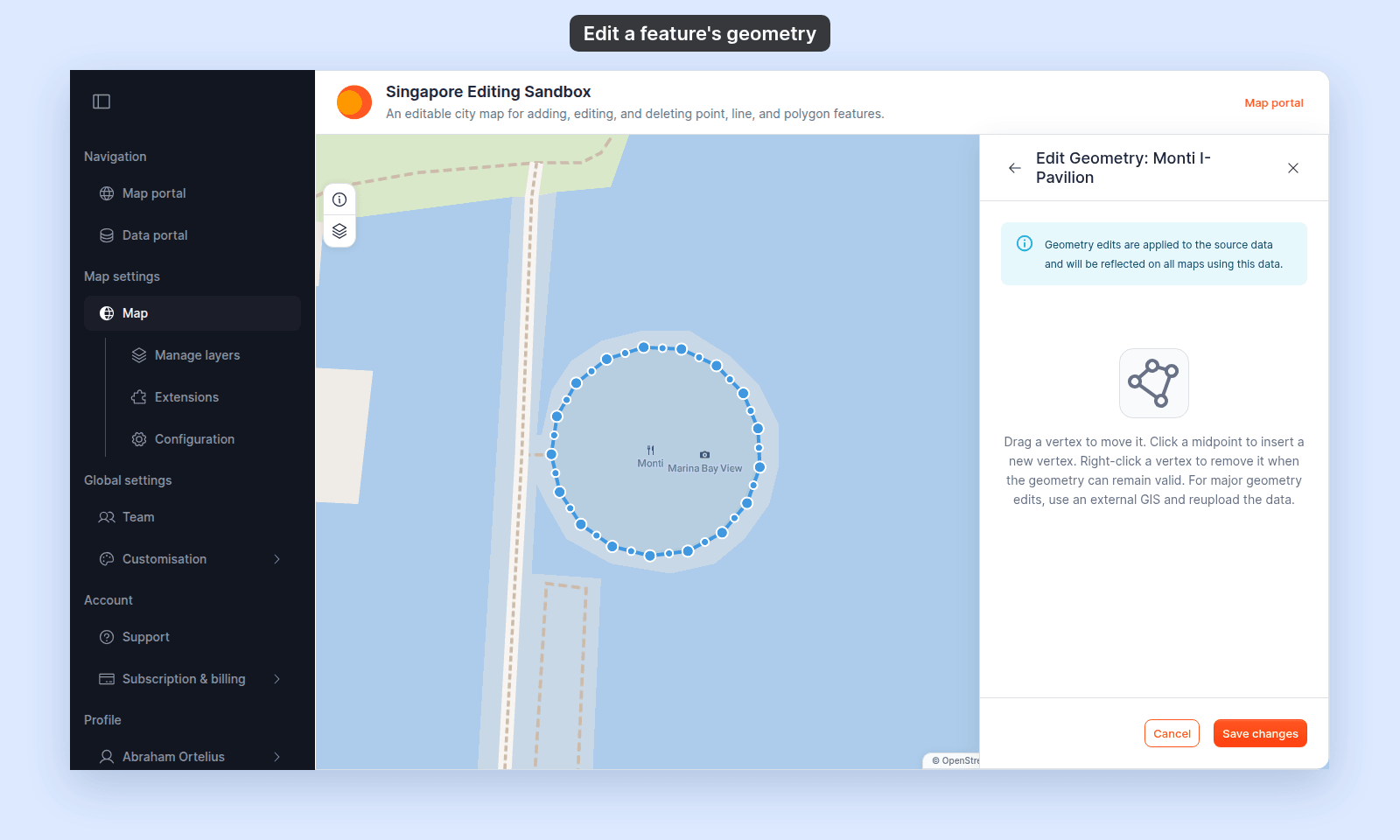
- **Line** — drag a vertex to move it. Click a midpoint to insert a new vertex.
- **Polygon** — drag a corner to move it. Click a midpoint to insert a new corner.
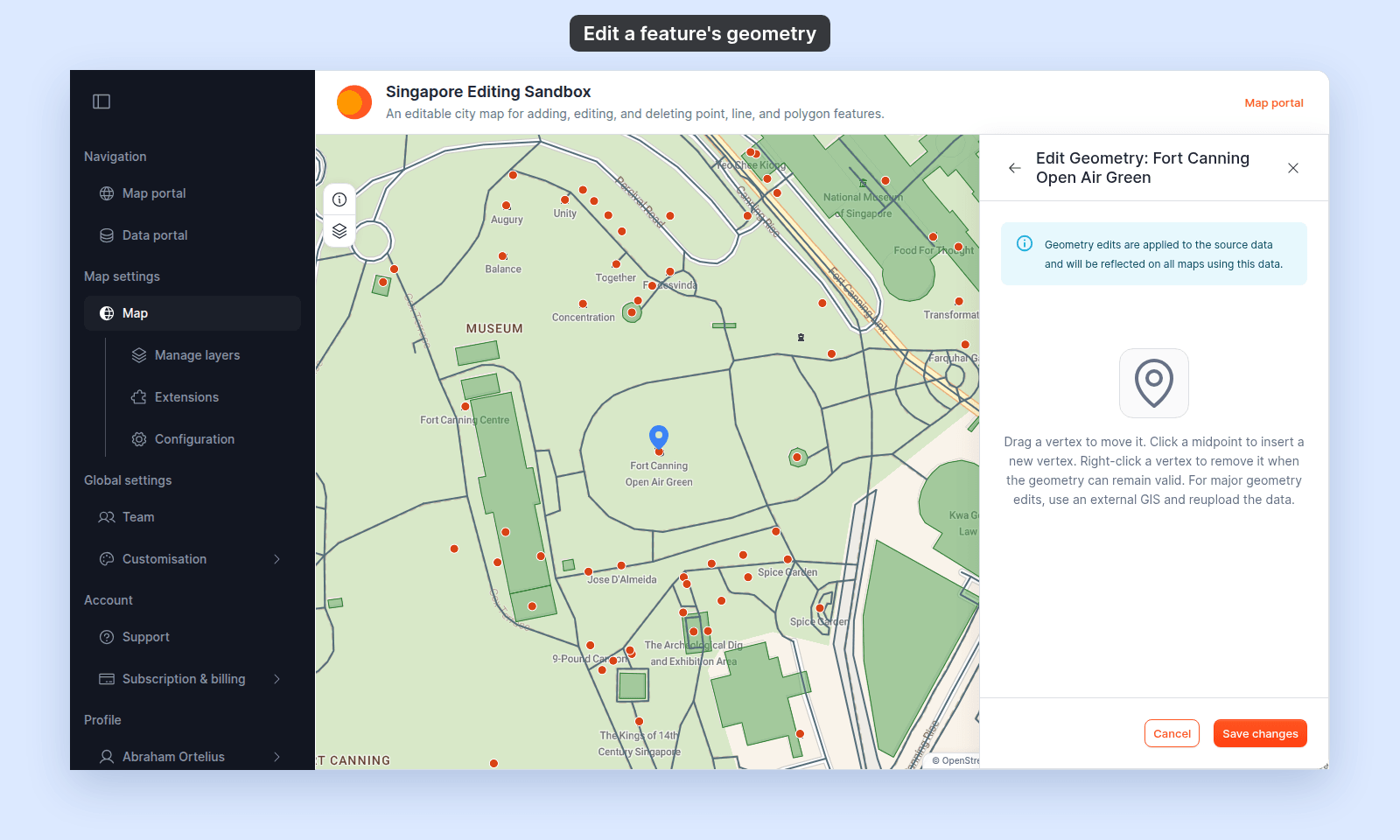
- **Point** — drag the blue marker to the new place.
For a point from an imported file, the panel shows the instructions for lines and polygons (`Drag a vertex to move it. Click a midpoint to insert a new vertex.`). Ignore them: a point has one marker, and you drag it.
{/* TODO: product - For a point from an imported file (a one-point MultiPoint), the Edit Geometry panel shows the line and polygon instructions ("Drag a vertex to move it. Click a midpoint to insert a new vertex. Right-click a vertex to remove it..."), because getInstructionText has no multipoint case and falls to the default (../mangomap packages/mangomap-ui/src/components/tool-panel/tools/popup/editing/edit-geometry-content.tsx:31-45). Plain points show "Drag the marker to move the point." When multipoint gets the point text, remove the sentence about the panel text and update the alt text of edit-feature-geometry--point.png. See v4-sample-data/DOCS-CAPTURE-COVERAGE.md, "Product issues". */}
## Remove a vertex
Right-click a vertex on a line or polygon to remove it. A vertex is removed only when the shape stays valid, so a line or polygon can't lose the vertices it needs.
## Multi-part features and polygons with holes
The editor works on one line or one polygon ring at a time. So that no part is lost, it does not open for:
- A feature with more than one part, such as a multipolygon with two islands, or a multipoint with two points.
- A polygon with a hole.
For these features, and for large changes, edit the data in a desktop GIS and [update the dataset from a file](/docs/data-updates/update-a-dataset-from-a-file).
## Save or cancel
After moving at least one coordinate, click `Save changes`. On success, the editor closes.
Click `Cancel` to remove the editing overlay without saving.
## Change geometry type
The editor preserves the feature's geometry family. It does not convert a point to a line, or a line to a polygon. Use a dataset with the required geometry type instead.
## If the editor doesn't open
Follow the checks in order to find out why the editor didn't open:
{/* diagram:edit-geometry-checks */}
{/* /diagram:edit-geometry-checks */}
A message appears instead of the editor:
| Message | What it means |
| --- | --- |
| `Editing multipart features or polygons with holes is not supported safely` | The feature has more than one part, or it is a polygon with a hole. |
| `Exact geometry could not be loaded` | MangoMap could not load the feature's shape. Close the popup, click the feature again, and retry. |
| `This feature is too large to edit safely` | The feature has more than 30,000 vertices, or its shape is more than 1 MB of data. Edit it in a desktop GIS. |
If the panel shows `Details could not be loaded` instead of the popup, it has no three-dot menu, so `Edit geometry` isn't available. See [A popup says “Details could not be loaded”](/docs/configuring-popups/troubleshoot-popup-details-not-loaded).
## If saving fails
- Make sure at least one coordinate changed.
- Correct invalid or incomplete geometry.
- Confirm that edit permission is still active.
- Retry after restoring the network connection.
## Related
- [How feature editing works](/docs/editing-features/concepts-feature-editing)
- [Add a feature](/docs/editing-features/add-a-feature)
- [Delete a feature](/docs/editing-features/delete-a-feature)
- [Feature edit controls](/docs/editing-features/feature-edit-controls-reference)
 ## Move or reshape the feature
- **Line** — drag a vertex to move it. Click a midpoint to insert a new vertex.
- **Polygon** — drag a corner to move it. Click a midpoint to insert a new corner.
- **Point** — drag the blue marker to the new place.
For a point from an imported file, the panel shows the instructions for lines and polygons (`Drag a vertex to move it. Click a midpoint to insert a new vertex.`). Ignore them: a point has one marker, and you drag it.
{/* TODO: product - For a point from an imported file (a one-point MultiPoint), the Edit Geometry panel shows the line and polygon instructions ("Drag a vertex to move it. Click a midpoint to insert a new vertex. Right-click a vertex to remove it..."), because getInstructionText has no multipoint case and falls to the default (../mangomap packages/mangomap-ui/src/components/tool-panel/tools/popup/editing/edit-geometry-content.tsx:31-45). Plain points show "Drag the marker to move the point." When multipoint gets the point text, remove the sentence about the panel text and update the alt text of edit-feature-geometry--point.png. See v4-sample-data/DOCS-CAPTURE-COVERAGE.md, "Product issues". */}
## Move or reshape the feature
- **Line** — drag a vertex to move it. Click a midpoint to insert a new vertex.
- **Polygon** — drag a corner to move it. Click a midpoint to insert a new corner.
- **Point** — drag the blue marker to the new place.
For a point from an imported file, the panel shows the instructions for lines and polygons (`Drag a vertex to move it. Click a midpoint to insert a new vertex.`). Ignore them: a point has one marker, and you drag it.
{/* TODO: product - For a point from an imported file (a one-point MultiPoint), the Edit Geometry panel shows the line and polygon instructions ("Drag a vertex to move it. Click a midpoint to insert a new vertex. Right-click a vertex to remove it..."), because getInstructionText has no multipoint case and falls to the default (../mangomap packages/mangomap-ui/src/components/tool-panel/tools/popup/editing/edit-geometry-content.tsx:31-45). Plain points show "Drag the marker to move the point." When multipoint gets the point text, remove the sentence about the panel text and update the alt text of edit-feature-geometry--point.png. See v4-sample-data/DOCS-CAPTURE-COVERAGE.md, "Product issues". */}
 ## Remove a vertex
Right-click a vertex on a line or polygon to remove it. A vertex is removed only when the shape stays valid, so a line or polygon can't lose the vertices it needs.
## Multi-part features and polygons with holes
The editor works on one line or one polygon ring at a time. So that no part is lost, it does not open for:
- A feature with more than one part, such as a multipolygon with two islands, or a multipoint with two points.
- A polygon with a hole.
For these features, and for large changes, edit the data in a desktop GIS and [update the dataset from a file](/docs/data-updates/update-a-dataset-from-a-file).
## Save or cancel
After moving at least one coordinate, click `Save changes`. On success, the editor closes.
Click `Cancel` to remove the editing overlay without saving.
## Change geometry type
The editor preserves the feature's geometry family. It does not convert a point to a line, or a line to a polygon. Use a dataset with the required geometry type instead.
## If the editor doesn't open
Follow the checks in order to find out why the editor didn't open:
{/* diagram:edit-geometry-checks */}
{/* /diagram:edit-geometry-checks */}
A message appears instead of the editor:
| Message | What it means |
| --- | --- |
| `Editing multipart features or polygons with holes is not supported safely` | The feature has more than one part, or it is a polygon with a hole. |
| `Exact geometry could not be loaded` | MangoMap could not load the feature's shape. Close the popup, click the feature again, and retry. |
| `This feature is too large to edit safely` | The feature has more than 30,000 vertices, or its shape is more than 1 MB of data. Edit it in a desktop GIS. |
If the panel shows `Details could not be loaded` instead of the popup, it has no three-dot menu, so `Edit geometry` isn't available. See [A popup says “Details could not be loaded”](/docs/configuring-popups/troubleshoot-popup-details-not-loaded).
## If saving fails
- Make sure at least one coordinate changed.
- Correct invalid or incomplete geometry.
- Confirm that edit permission is still active.
- Retry after restoring the network connection.
## Related
- [How feature editing works](/docs/editing-features/concepts-feature-editing)
- [Add a feature](/docs/editing-features/add-a-feature)
- [Delete a feature](/docs/editing-features/delete-a-feature)
- [Feature edit controls](/docs/editing-features/feature-edit-controls-reference)
## Remove a vertex
Right-click a vertex on a line or polygon to remove it. A vertex is removed only when the shape stays valid, so a line or polygon can't lose the vertices it needs.
## Multi-part features and polygons with holes
The editor works on one line or one polygon ring at a time. So that no part is lost, it does not open for:
- A feature with more than one part, such as a multipolygon with two islands, or a multipoint with two points.
- A polygon with a hole.
For these features, and for large changes, edit the data in a desktop GIS and [update the dataset from a file](/docs/data-updates/update-a-dataset-from-a-file).
## Save or cancel
After moving at least one coordinate, click `Save changes`. On success, the editor closes.
Click `Cancel` to remove the editing overlay without saving.
## Change geometry type
The editor preserves the feature's geometry family. It does not convert a point to a line, or a line to a polygon. Use a dataset with the required geometry type instead.
## If the editor doesn't open
Follow the checks in order to find out why the editor didn't open:
{/* diagram:edit-geometry-checks */}
{/* /diagram:edit-geometry-checks */}
A message appears instead of the editor:
| Message | What it means |
| --- | --- |
| `Editing multipart features or polygons with holes is not supported safely` | The feature has more than one part, or it is a polygon with a hole. |
| `Exact geometry could not be loaded` | MangoMap could not load the feature's shape. Close the popup, click the feature again, and retry. |
| `This feature is too large to edit safely` | The feature has more than 30,000 vertices, or its shape is more than 1 MB of data. Edit it in a desktop GIS. |
If the panel shows `Details could not be loaded` instead of the popup, it has no three-dot menu, so `Edit geometry` isn't available. See [A popup says “Details could not be loaded”](/docs/configuring-popups/troubleshoot-popup-details-not-loaded).
## If saving fails
- Make sure at least one coordinate changed.
- Correct invalid or incomplete geometry.
- Confirm that edit permission is still active.
- Retry after restoring the network connection.
## Related
- [How feature editing works](/docs/editing-features/concepts-feature-editing)
- [Add a feature](/docs/editing-features/add-a-feature)
- [Delete a feature](/docs/editing-features/delete-a-feature)
- [Feature edit controls](/docs/editing-features/feature-edit-controls-reference)