---
title: "A custom domain is not connecting"
description: "Visitors see an error or a blank page on your custom domain. Check the DNS record at your registrar first, then check the Domain & whitelabel page."
sidebar:
  label: "Domain not connecting"
---

You connected a custom domain on the `Domain & whitelabel` page, but visitors hitting the domain see an error or the page does not load. Usually MangoMap is connected, but your registrar has a missing, wrong, or pending DNS record. Less often, MangoMap rejects the domain value.

The diagram shows the order to check, and the fix at each step.

<!-- diagram:custom-domain-diagnosis-flow -->
<svg class="dark:hidden" style="width: 100%; height: auto" viewBox="0 0 640 684" xmlns="http://www.w3.org/2000/svg" role="img" aria-labelledby="custom-domain-diagnosis-flow-inline-title custom-domain-diagnosis-flow-inline-desc">
  <title id="custom-domain-diagnosis-flow-inline-title">Why a custom domain does not load</title>
  <desc id="custom-domain-diagnosis-flow-inline-desc">Flowchart: with no green plug in Custom Domain, re-type a plain host and click Connect; if the host differs from the one at your registrar, fix it on one side; if the DNS record does not point at MangoMap, add or fix it; if public resolvers disagree, wait for propagation; if every check passes, ask support.</desc>
  <defs>
    <marker id="custom-domain-diagnosis-flow-inline-arrow" markerWidth="8" markerHeight="6" refX="7" refY="3" orient="auto"><polygon points="0 0, 8 3, 0 6" fill="#525252"/></marker>
    <marker id="custom-domain-diagnosis-flow-inline-arrow-accent" markerWidth="8" markerHeight="6" refX="7" refY="3" orient="auto"><polygon points="0 0, 8 3, 0 6" fill="#c4360c"/></marker>
  </defs>
  <rect width="100%" height="100%" fill="#f5f5f5"/>
  <path d="M192 60 L192 86" fill="none" stroke="#525252" stroke-width="1.2" marker-end="url(#custom-domain-diagnosis-flow-inline-arrow)"/>
  <path d="M316 136 L358 136" fill="none" stroke="#525252" stroke-width="1.2" marker-end="url(#custom-domain-diagnosis-flow-inline-arrow)"/>
  <path d="M316 264 L358 264" fill="none" stroke="#525252" stroke-width="1.2" marker-end="url(#custom-domain-diagnosis-flow-inline-arrow)"/>
  <path d="M316 392 L358 392" fill="none" stroke="#525252" stroke-width="1.2" marker-end="url(#custom-domain-diagnosis-flow-inline-arrow)"/>
  <path d="M316 520 L358 520" fill="none" stroke="#525252" stroke-width="1.2" marker-end="url(#custom-domain-diagnosis-flow-inline-arrow)"/>
  <path d="M192 184 L192 214" fill="none" stroke="#525252" stroke-width="1.2" marker-end="url(#custom-domain-diagnosis-flow-inline-arrow)"/>
  <path d="M192 312 L192 342" fill="none" stroke="#525252" stroke-width="1.2" marker-end="url(#custom-domain-diagnosis-flow-inline-arrow)"/>
  <path d="M192 440 L192 470" fill="none" stroke="#525252" stroke-width="1.2" marker-end="url(#custom-domain-diagnosis-flow-inline-arrow)"/>
  <path d="M192 568 L192 606" fill="none" stroke="#525252" stroke-width="1.2" marker-end="url(#custom-domain-diagnosis-flow-inline-arrow)"/>
  <rect x="324" y="112" width="26" height="16" rx="2" fill="#f5f5f5"/><text x="337" y="124" fill="#525252" font-size="10" font-weight="600" letter-spacing="0.1em" font-family="inherit" text-anchor="middle">NO</text>
  <rect x="324" y="240" width="26" height="16" rx="2" fill="#f5f5f5"/><text x="337" y="252" fill="#525252" font-size="10" font-weight="600" letter-spacing="0.1em" font-family="inherit" text-anchor="middle">NO</text>
  <rect x="324" y="368" width="26" height="16" rx="2" fill="#f5f5f5"/><text x="337" y="380" fill="#525252" font-size="10" font-weight="600" letter-spacing="0.1em" font-family="inherit" text-anchor="middle">NO</text>
  <rect x="324" y="496" width="26" height="16" rx="2" fill="#f5f5f5"/><text x="337" y="508" fill="#525252" font-size="10" font-weight="600" letter-spacing="0.1em" font-family="inherit" text-anchor="middle">NO</text>
  <rect x="200" y="195" width="34" height="16" rx="2" fill="#f5f5f5"/><text x="217" y="207" fill="#525252" font-size="10" font-weight="600" letter-spacing="0.1em" font-family="inherit" text-anchor="middle">YES</text>
  <rect x="200" y="323" width="34" height="16" rx="2" fill="#f5f5f5"/><text x="217" y="335" fill="#525252" font-size="10" font-weight="600" letter-spacing="0.1em" font-family="inherit" text-anchor="middle">YES</text>
  <rect x="200" y="451" width="34" height="16" rx="2" fill="#f5f5f5"/><text x="217" y="463" fill="#525252" font-size="10" font-weight="600" letter-spacing="0.1em" font-family="inherit" text-anchor="middle">YES</text>
  <rect x="200" y="579" width="34" height="16" rx="2" fill="#f5f5f5"/><text x="217" y="591" fill="#525252" font-size="10" font-weight="600" letter-spacing="0.1em" font-family="inherit" text-anchor="middle">YES</text>
  <rect x="76" y="16" width="232" height="44" rx="20" fill="rgba(23,23,23,0.04)" stroke="rgba(23,23,23,0.32)" stroke-width="1"/>
  <text x="192" y="43" fill="#171717" font-size="14" font-weight="600" font-family="inherit" text-anchor="middle">Your domain does not load</text>
  <polygon points="192,88 316,136 192,184 68,136" fill="#ffffff" stroke="#171717" stroke-width="1"/><text x="192" y="131" fill="#171717" font-size="14" font-weight="600" font-family="inherit" text-anchor="middle">Green plug in</text><text x="192" y="149" fill="#171717" font-size="14" font-weight="600" font-family="inherit" text-anchor="middle">Custom Domain?</text>
  <polygon points="192,216 316,264 192,312 68,264" fill="#ffffff" stroke="#171717" stroke-width="1"/><text x="192" y="259" fill="#171717" font-size="14" font-weight="600" font-family="inherit" text-anchor="middle">Same host as at</text><text x="192" y="277" fill="#171717" font-size="14" font-weight="600" font-family="inherit" text-anchor="middle">your registrar?</text>
  <polygon points="192,344 316,392 192,440 68,392" fill="rgba(196,54,12,0.08)" stroke="#c4360c" stroke-width="1.4"/><text x="192" y="387" fill="#171717" font-size="14" font-weight="600" font-family="inherit" text-anchor="middle">Record points</text><text x="192" y="405" fill="#171717" font-size="14" font-weight="600" font-family="inherit" text-anchor="middle">at MangoMap?</text>
  <polygon points="192,472 316,520 192,568 68,520" fill="#ffffff" stroke="#171717" stroke-width="1"/><text x="192" y="515" fill="#171717" font-size="14" font-weight="600" font-family="inherit" text-anchor="middle">Resolvers give</text><text x="192" y="533" fill="#171717" font-size="14" font-weight="600" font-family="inherit" text-anchor="middle">the same answer?</text>
  <rect x="360" y="100" width="264" height="72" rx="20" fill="rgba(23,23,23,0.04)" stroke="rgba(23,23,23,0.32)" stroke-width="1"/><text x="492" y="122" fill="#171717" font-size="14" font-weight="600" font-family="inherit" text-anchor="middle">Re-type a plain host</text><text x="492" y="142" fill="#525252" font-size="12" font-family="inherit" text-anchor="middle">such as maps.yourcompany.com,</text><text x="492" y="158" fill="#525252" font-size="12" font-family="inherit" text-anchor="middle">then click Connect</text>
  <rect x="360" y="228" width="264" height="72" rx="20" fill="rgba(23,23,23,0.04)" stroke="rgba(23,23,23,0.32)" stroke-width="1"/><text x="492" y="250" fill="#171717" font-size="14" font-weight="600" font-family="inherit" text-anchor="middle">Fix the host on one side</text><text x="492" y="270" fill="#525252" font-size="12" font-family="inherit" text-anchor="middle">Disconnect and Connect the right one,</text><text x="492" y="286" fill="#525252" font-size="12" font-family="inherit" text-anchor="middle">or fix the record at your registrar</text>
  <rect x="360" y="356" width="264" height="72" rx="20" fill="rgba(23,23,23,0.04)" stroke="rgba(23,23,23,0.32)" stroke-width="1"/><text x="492" y="378" fill="#171717" font-size="14" font-weight="600" font-family="inherit" text-anchor="middle">Add or fix the DNS record</text><text x="492" y="398" fill="#525252" font-size="12" font-family="inherit" text-anchor="middle">CNAME to mangomap.com, or</text><text x="492" y="414" fill="#525252" font-size="12" font-family="inherit" text-anchor="middle">A record to 174.129.28.51</text>
  <rect x="360" y="492" width="264" height="56" rx="20" fill="rgba(23,23,23,0.04)" stroke="rgba(23,23,23,0.32)" stroke-width="1"/><text x="492" y="517" fill="#171717" font-size="14" font-weight="600" font-family="inherit" text-anchor="middle">Wait, then test again</text><text x="492" y="535" fill="#525252" font-size="12" font-family="inherit" text-anchor="middle">the change is still propagating</text>
  <rect x="76" y="608" width="232" height="60" rx="20" fill="rgba(23,23,23,0.04)" stroke="rgba(23,23,23,0.32)" stroke-width="1"/>
  <text x="192" y="633" fill="#171717" font-size="14" font-weight="600" font-family="inherit" text-anchor="middle">Ask support</text>
  <text x="192" y="651" fill="#525252" font-size="12" font-family="inherit" text-anchor="middle">include the domain and dig output</text>
</svg>
<svg class="hidden dark:block" style="width: 100%; height: auto" viewBox="0 0 640 684" xmlns="http://www.w3.org/2000/svg" role="img" aria-labelledby="custom-domain-diagnosis-flow-inline-dark-title custom-domain-diagnosis-flow-inline-dark-desc">
  <title id="custom-domain-diagnosis-flow-inline-dark-title">Why a custom domain does not load</title>
  <desc id="custom-domain-diagnosis-flow-inline-dark-desc">Flowchart: with no green plug in Custom Domain, re-type a plain host and click Connect; if the host differs from the one at your registrar, fix it on one side; if the DNS record does not point at MangoMap, add or fix it; if public resolvers disagree, wait for propagation; if every check passes, ask support.</desc>
  <defs>
    <marker id="custom-domain-diagnosis-flow-inline-dark-arrow" markerWidth="8" markerHeight="6" refX="7" refY="3" orient="auto"><polygon points="0 0, 8 3, 0 6" fill="#a3a3a3"/></marker>
    <marker id="custom-domain-diagnosis-flow-inline-dark-arrow-accent" markerWidth="8" markerHeight="6" refX="7" refY="3" orient="auto"><polygon points="0 0, 8 3, 0 6" fill="#ff7a4d"/></marker>
  </defs>
  <rect width="100%" height="100%" fill="#141414"/>
  <path d="M192 60 L192 86" fill="none" stroke="#a3a3a3" stroke-width="1.2" marker-end="url(#custom-domain-diagnosis-flow-inline-dark-arrow)"/>
  <path d="M316 136 L358 136" fill="none" stroke="#a3a3a3" stroke-width="1.2" marker-end="url(#custom-domain-diagnosis-flow-inline-dark-arrow)"/>
  <path d="M316 264 L358 264" fill="none" stroke="#a3a3a3" stroke-width="1.2" marker-end="url(#custom-domain-diagnosis-flow-inline-dark-arrow)"/>
  <path d="M316 392 L358 392" fill="none" stroke="#a3a3a3" stroke-width="1.2" marker-end="url(#custom-domain-diagnosis-flow-inline-dark-arrow)"/>
  <path d="M316 520 L358 520" fill="none" stroke="#a3a3a3" stroke-width="1.2" marker-end="url(#custom-domain-diagnosis-flow-inline-dark-arrow)"/>
  <path d="M192 184 L192 214" fill="none" stroke="#a3a3a3" stroke-width="1.2" marker-end="url(#custom-domain-diagnosis-flow-inline-dark-arrow)"/>
  <path d="M192 312 L192 342" fill="none" stroke="#a3a3a3" stroke-width="1.2" marker-end="url(#custom-domain-diagnosis-flow-inline-dark-arrow)"/>
  <path d="M192 440 L192 470" fill="none" stroke="#a3a3a3" stroke-width="1.2" marker-end="url(#custom-domain-diagnosis-flow-inline-dark-arrow)"/>
  <path d="M192 568 L192 606" fill="none" stroke="#a3a3a3" stroke-width="1.2" marker-end="url(#custom-domain-diagnosis-flow-inline-dark-arrow)"/>
  <rect x="324" y="112" width="26" height="16" rx="2" fill="#141414"/><text x="337" y="124" fill="#a3a3a3" font-size="10" font-weight="600" letter-spacing="0.1em" font-family="inherit" text-anchor="middle">NO</text>
  <rect x="324" y="240" width="26" height="16" rx="2" fill="#141414"/><text x="337" y="252" fill="#a3a3a3" font-size="10" font-weight="600" letter-spacing="0.1em" font-family="inherit" text-anchor="middle">NO</text>
  <rect x="324" y="368" width="26" height="16" rx="2" fill="#141414"/><text x="337" y="380" fill="#a3a3a3" font-size="10" font-weight="600" letter-spacing="0.1em" font-family="inherit" text-anchor="middle">NO</text>
  <rect x="324" y="496" width="26" height="16" rx="2" fill="#141414"/><text x="337" y="508" fill="#a3a3a3" font-size="10" font-weight="600" letter-spacing="0.1em" font-family="inherit" text-anchor="middle">NO</text>
  <rect x="200" y="195" width="34" height="16" rx="2" fill="#141414"/><text x="217" y="207" fill="#a3a3a3" font-size="10" font-weight="600" letter-spacing="0.1em" font-family="inherit" text-anchor="middle">YES</text>
  <rect x="200" y="323" width="34" height="16" rx="2" fill="#141414"/><text x="217" y="335" fill="#a3a3a3" font-size="10" font-weight="600" letter-spacing="0.1em" font-family="inherit" text-anchor="middle">YES</text>
  <rect x="200" y="451" width="34" height="16" rx="2" fill="#141414"/><text x="217" y="463" fill="#a3a3a3" font-size="10" font-weight="600" letter-spacing="0.1em" font-family="inherit" text-anchor="middle">YES</text>
  <rect x="200" y="579" width="34" height="16" rx="2" fill="#141414"/><text x="217" y="591" fill="#a3a3a3" font-size="10" font-weight="600" letter-spacing="0.1em" font-family="inherit" text-anchor="middle">YES</text>
  <rect x="76" y="16" width="232" height="44" rx="20" fill="rgba(242,242,242,0.05)" stroke="rgba(242,242,242,0.34)" stroke-width="1"/>
  <text x="192" y="43" fill="#f2f2f2" font-size="14" font-weight="600" font-family="inherit" text-anchor="middle">Your domain does not load</text>
  <polygon points="192,88 316,136 192,184 68,136" fill="#1c1c1c" stroke="#f2f2f2" stroke-width="1"/><text x="192" y="131" fill="#f2f2f2" font-size="14" font-weight="600" font-family="inherit" text-anchor="middle">Green plug in</text><text x="192" y="149" fill="#f2f2f2" font-size="14" font-weight="600" font-family="inherit" text-anchor="middle">Custom Domain?</text>
  <polygon points="192,216 316,264 192,312 68,264" fill="#1c1c1c" stroke="#f2f2f2" stroke-width="1"/><text x="192" y="259" fill="#f2f2f2" font-size="14" font-weight="600" font-family="inherit" text-anchor="middle">Same host as at</text><text x="192" y="277" fill="#f2f2f2" font-size="14" font-weight="600" font-family="inherit" text-anchor="middle">your registrar?</text>
  <polygon points="192,344 316,392 192,440 68,392" fill="rgba(255,122,77,0.10)" stroke="#ff7a4d" stroke-width="1.4"/><text x="192" y="387" fill="#f2f2f2" font-size="14" font-weight="600" font-family="inherit" text-anchor="middle">Record points</text><text x="192" y="405" fill="#f2f2f2" font-size="14" font-weight="600" font-family="inherit" text-anchor="middle">at MangoMap?</text>
  <polygon points="192,472 316,520 192,568 68,520" fill="#1c1c1c" stroke="#f2f2f2" stroke-width="1"/><text x="192" y="515" fill="#f2f2f2" font-size="14" font-weight="600" font-family="inherit" text-anchor="middle">Resolvers give</text><text x="192" y="533" fill="#f2f2f2" font-size="14" font-weight="600" font-family="inherit" text-anchor="middle">the same answer?</text>
  <rect x="360" y="100" width="264" height="72" rx="20" fill="rgba(242,242,242,0.05)" stroke="rgba(242,242,242,0.34)" stroke-width="1"/><text x="492" y="122" fill="#f2f2f2" font-size="14" font-weight="600" font-family="inherit" text-anchor="middle">Re-type a plain host</text><text x="492" y="142" fill="#a3a3a3" font-size="12" font-family="inherit" text-anchor="middle">such as maps.yourcompany.com,</text><text x="492" y="158" fill="#a3a3a3" font-size="12" font-family="inherit" text-anchor="middle">then click Connect</text>
  <rect x="360" y="228" width="264" height="72" rx="20" fill="rgba(242,242,242,0.05)" stroke="rgba(242,242,242,0.34)" stroke-width="1"/><text x="492" y="250" fill="#f2f2f2" font-size="14" font-weight="600" font-family="inherit" text-anchor="middle">Fix the host on one side</text><text x="492" y="270" fill="#a3a3a3" font-size="12" font-family="inherit" text-anchor="middle">Disconnect and Connect the right one,</text><text x="492" y="286" fill="#a3a3a3" font-size="12" font-family="inherit" text-anchor="middle">or fix the record at your registrar</text>
  <rect x="360" y="356" width="264" height="72" rx="20" fill="rgba(242,242,242,0.05)" stroke="rgba(242,242,242,0.34)" stroke-width="1"/><text x="492" y="378" fill="#f2f2f2" font-size="14" font-weight="600" font-family="inherit" text-anchor="middle">Add or fix the DNS record</text><text x="492" y="398" fill="#a3a3a3" font-size="12" font-family="inherit" text-anchor="middle">CNAME to mangomap.com, or</text><text x="492" y="414" fill="#a3a3a3" font-size="12" font-family="inherit" text-anchor="middle">A record to 174.129.28.51</text>
  <rect x="360" y="492" width="264" height="56" rx="20" fill="rgba(242,242,242,0.05)" stroke="rgba(242,242,242,0.34)" stroke-width="1"/><text x="492" y="517" fill="#f2f2f2" font-size="14" font-weight="600" font-family="inherit" text-anchor="middle">Wait, then test again</text><text x="492" y="535" fill="#a3a3a3" font-size="12" font-family="inherit" text-anchor="middle">the change is still propagating</text>
  <rect x="76" y="608" width="232" height="60" rx="20" fill="rgba(242,242,242,0.05)" stroke="rgba(242,242,242,0.34)" stroke-width="1"/>
  <text x="192" y="633" fill="#f2f2f2" font-size="14" font-weight="600" font-family="inherit" text-anchor="middle">Ask support</text>
  <text x="192" y="651" fill="#a3a3a3" font-size="12" font-family="inherit" text-anchor="middle">include the domain and dig output</text>
</svg>
<!-- /diagram:custom-domain-diagnosis-flow -->

## Most likely cause: DNS is not pointed at MangoMap

The domain loads only after the DNS record at your domain registrar is in place and has had time to propagate. MangoMap does not check DNS when you click `Connect`, so the green plug can show while the record is missing. Typically that record is a CNAME for a subdomain like `maps.yourcompany.com`, or an A record for a root domain. Without that record, the browser cannot resolve the domain and the page never loads.

To verify:

- Open the `Domain & whitelabel` page. The `Custom Domain` field shows the connected value with a green plug icon. The MangoMap side is fine.
- Check the DNS record. The simplest check is to paste your domain into [dnschecker.org](https://dnschecker.org) and pick the record type (`A` for a root domain, `CNAME` for a subdomain). The expected value is `174.129.28.51` for an `A` record, or `mangomap.com` for a `CNAME`. If the result is empty or points somewhere else, the DNS is the issue. On the command line, `dig` gives the same answer. Replace `maps.yourcompany.com` with your domain:

  ```console
  $ dig +short maps.yourcompany.com CNAME
  mangomap.com.
  ```

To fix:

- Add or update the DNS record at your registrar to point the domain at MangoMap. For a subdomain, use a `CNAME` to `mangomap.com.` (or `mangomap.com` if your registrar rejects the trailing `.`). For a root domain, use an `A` record to `174.129.28.51`. See [How to connect a custom domain](/docs/customisation/connect-a-custom-domain) for the full DNS table.
- DNS changes can take minutes or hours. Wait, then test again.

## Less common: DNS has changed but the change has not propagated

If you just added or changed the DNS record, browsers may still be using the old answer. Different ISPs and DNS resolvers cache for different durations.

To verify:

- Open [dnschecker.org](https://dnschecker.org), enter your domain, and pick the record type. The page checks resolvers in many locations at once and shows which ones see the new value and which ones don't. Mixed results mean propagation is still in progress.
- Or, on the command line, ask Google's resolver (`8.8.8.8`) and Cloudflare's resolver (`1.1.1.1`). If the answers differ, propagation is in progress:

  ```console
  $ dig +short maps.yourcompany.com CNAME @8.8.8.8
  $ dig +short maps.yourcompany.com CNAME @1.1.1.1
  ```
- Wait, then test again.

## Less common: the domain in MangoMap is the wrong host

The domain you typed into `Custom Domain` must exactly match the host you configured at your registrar. A mismatch (e.g. `maps.yourcompany.com` in MangoMap but `gis.yourcompany.com` in DNS) means MangoMap can't recognise the request.

To verify:

- Open the `Domain & whitelabel` page. Read the `Custom Domain` value carefully.
- Check the record at your registrar.

To fix:

- If MangoMap has the wrong host, click `Disconnect`, type the correct host, and click `Connect`.
- If your registrar has the wrong host, fix it there.

## Less common: MangoMap rejected the domain

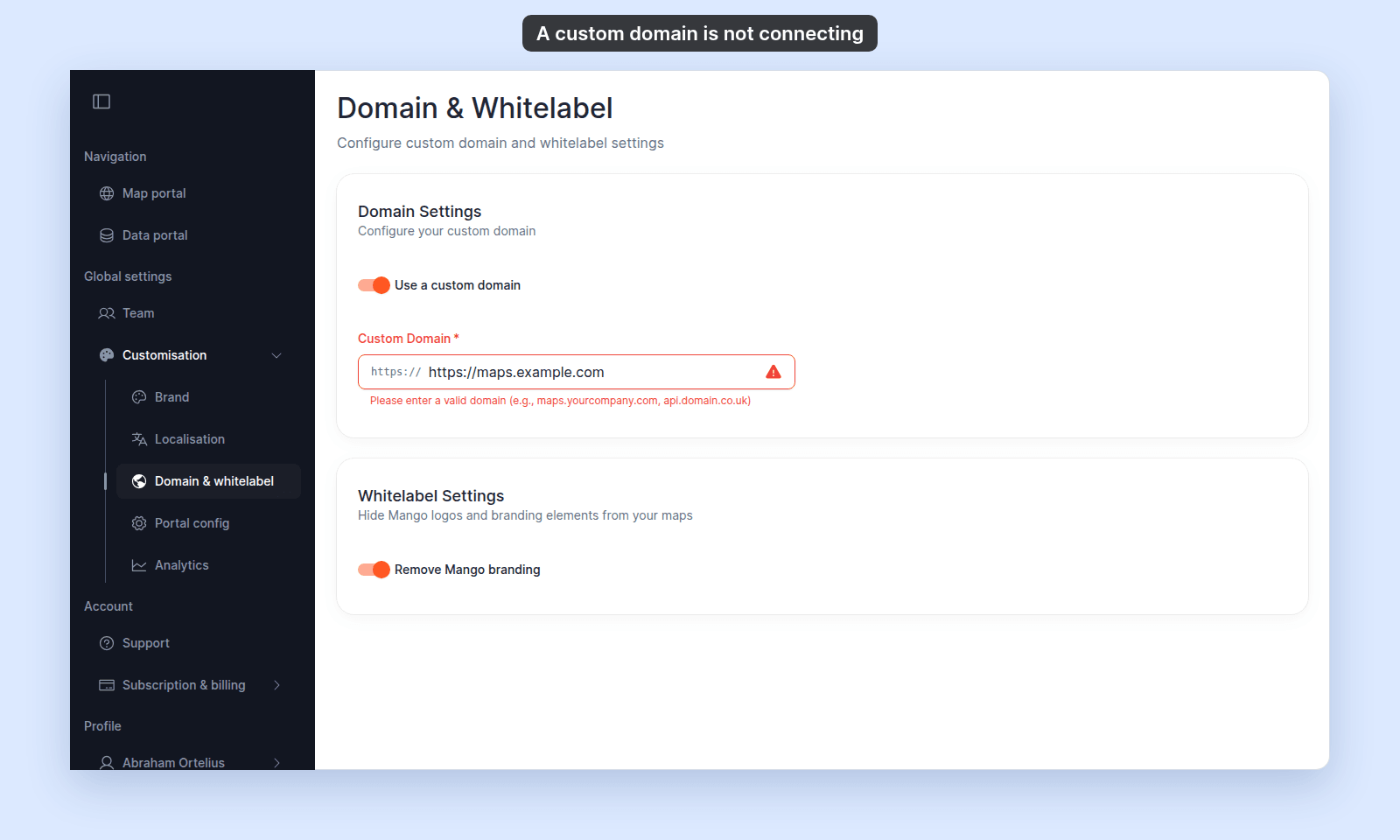
When you typed the domain, MangoMap may have shown a validation error. A rejected domain shows a red warning icon in the field, and `Connect` does not appear.

<img src="/_assets/customisation/troubleshoot-custom-domain-not-connecting--rejected.png" alt="Domain Settings with https://maps.example.com typed in the Custom Domain field, a red warning icon, and the message Please enter a valid domain (e.g., maps.yourcompany.com, api.domain.co.uk)" width="1600" height="960" />

| What you see | Cause |
| --- | --- |
| `Please enter a valid domain (e.g., maps.yourcompany.com, api.domain.co.uk)` | The text is not a plain host. It starts with `https://`, has a space, or has no dot (such as `localhost`). |
| `Invalid domain format` | The text starts with a protocol other than `https://`, such as `http://`. |
| The red warning icon with no message | The host contains `localhost`, such as `maps.localhost.com`. Use a public domain. |

In each case, the connect did not happen. Re-type the domain as a plain host, such as `maps.yourcompany.com`. A valid host gets a green check and the `Connect` button. Click `Connect` again.

## If none of these checks

Ask support to check your account, the connected domain, and the DNS resolution from MangoMap's side. Include the domain, your account name, and a `dig` output if you have one.

## Related

- [How to connect a custom domain](/docs/customisation/connect-a-custom-domain)
- [Customisation menu reference](/docs/customisation/customisation-menu-reference)

---