---
title: "How to show or hide content based on a feature's attributes"
description: "Show different popup content for each feature, from its attribute values: text, images, buttons, tables, charts, or a second condition."
seo:
title: "Show or hide popup content"
sidebar:
label: "Conditional content"
---
A conditional shows different content in a custom popup for each feature, based on that feature's attribute values. You set a condition, such as `bookable equals true` or `photo_url is not null`, and choose what the popup shows when it is true and when it is false.
**[See it on an example map](https://mangomap-staging.com/examples-staging/maps/y4h0ctdr/popup-media-logic-lab)**
Open the Popup Media & Logic Lab. In the legend, turn on `Sites — Logic` and turn off `Sites — Default`. Click a few sites. The `Status` and `Bookings` text changes from site to site, and a photo shows only when the site has one.
Each branch can hold much more than a line of text:
- **Rich content:** formatted text with headings, colours, and lists, plus field values, links, images, buttons, tables, charts, and equations. A site with a photo can show it with a booking button; a site without one can show a short note instead.
- **A second conditional:** test another value, for if, else-if, else logic.
- **A field's value,** or **nothing**, so the whole section disappears.
Click `Insert conditional` in the popup editor to build one in three steps: `Condition`, `Output`, and `Test`.
{/* video-content: id=conditional-content-wizard
Start: Popup Media & Logic Lab with the Popup section of Sites — Logic open.
The Custom popup editor shows the existing template, and the cursor is at the
end of the template.
Show:
1. Click Insert conditional. The Conditional Expression builder opens on the
Condition step.
2. Pick bookable as the field, equals as the operator, and type true as the
value.
3. Click Next. The Output step opens.
4. For the TRUE branch, set Content Type to Rich Content and type
"Bookings open. Ask at the front desk." For the FALSE branch, set Content
Type to Nothing.
5. Click Next. The Test step shows sample 1 with its TRUE or FALSE chip and its
output.
6. Click Next sample until a sample shows FALSE and an empty output.
End: The Test step on a FALSE sample, with Save not clicked.
Exclude: Authentication, loading screens, the Save and Save Changes buttons,
and any saved change. The builder and editor are dropped when the capture ends.
*/}
{/* walkthrough: id=conditional-content-wizard */}
{/* /walkthrough */}
## Before you start
- The popup type must be `Custom`. See [How to write a custom popup template](/docs/configuring-popups/write-custom-popup-template).
- Decide what attribute drives the condition before opening the wizard. Conditionals work on attribute values — you'll need to know which field and what comparison.
## Open the conditional builder
In the Custom popup editor, place the cursor where the conditional content should appear. Click `Insert conditional` in the toolbar.
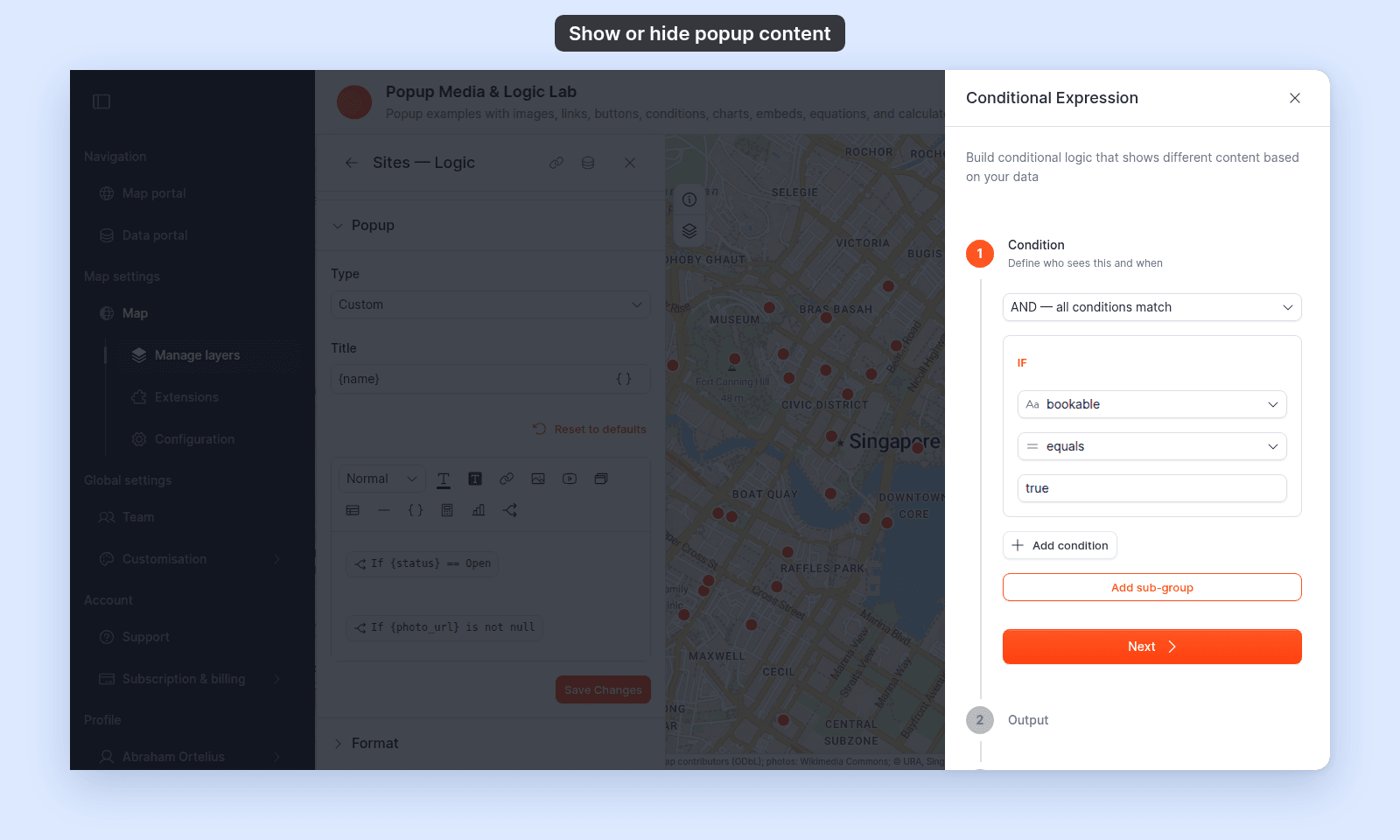
The `Conditional Expression` builder opens. It has three steps: `Condition`, `Output`, and `Test`. This example shows the `Condition` step for `bookable` equals `true`:
Click any step to open it. You can complete the steps in any order.
## Step 1 — Condition
Set up the comparison that decides whether the conditional section renders.
The wizard lets you build a condition like _"`bookable` equals `true`"_ or _"`population` is greater than `10000`"_. Each comparison has three parts:
- **Field** — the layer attribute to test.
- **Operator** — the comparison.
- **Value** — what to compare against.
Available operators (as they appear in the dropdown):
| Operator | Meaning |
| --- | --- |
| `equals` | Field value matches the given value |
| `does not equal` | Field value is anything other than the given value |
| `is greater than` | Field value is numerically larger |
| `is less than` | Field value is numerically smaller |
| `is at least` | Field value is greater than or equal to |
| `is at most` | Field value is less than or equal to |
| `is null` | Field has no value for this feature |
| `is not null` | Field has any value for this feature |
Click `Add condition` to add more conditions. The list above the conditions sets how they combine:
- **`AND — all conditions match`** — the default. A feature matches only when every condition is true.
- **`OR — any condition matches`** — a feature matches when at least one condition is true.
Click `Add sub-group` to add a group of conditions with its own `AND` or `OR`. For example: `status equals Open` AND a sub-group of `bookable equals true` OR `phone is not null`. A sub-group cannot hold another sub-group.
Click `Next` to advance to Step 2.
## Step 2 — Output
Choose what the popup shows when the condition is true, and when it is false. The panel shows both branches at once. For each one, pick a `Content Type`:
- **Field** — one attribute's value, with its formatting from the Format tab. Pick the field in `Select Field`.
- **Rich Content** — an editor with its own toolbar, almost the same as the popup editor. See [What a Rich Content branch can hold](#what-a-rich-content-branch-can-hold).
- **Conditional** — a second conditional. See [Nest a second conditional](#nest-a-second-conditional).
- **Nothing** — no content. Use it on the false branch to hide the whole section when the condition fails.
Each branch starts at `Please select...`. Pick a content type for both before you go on.
### What a Rich Content branch can hold
The Rich Content editor has the same tools as the popup editor, so a branch can be a complete popup section:
| Content | What it does in a branch | How to |
| --- | --- | --- |
| Text and formatting | Headings, bold, italic, colours, alignment, lists, quotes, and dividers. | [Write a custom popup template](/docs/configuring-popups/write-custom-popup-template) |
| Field values | `Insert simple variable` adds a `{field_name}` that shows the feature's value. | [Insert attribute values](/docs/configuring-popups/insert-attribute-values-into-popup) |
| Links | Web, email, phone, and text-message links, with `{field_name}` in the address. | [Add call or message links](/docs/configuring-popups/add-call-or-message-links-to-popup) |
| Images | One image for all features, or `{photo_url}` for each feature's own image. | [Add images](/docs/configuring-popups/add-images-to-popup) |
| Buttons | A button that opens a page or starts an email, call, or message. | [Add interactive buttons](/docs/configuring-popups/add-interactive-buttons-to-popup) |
| Tables | A table of labels and field values. | [Add tables](/docs/configuring-popups/add-tables-to-popup) |
| Charts | A bar or pie chart of the feature's number fields. | [Add charts](/docs/configuring-popups/add-charts-to-popup) |
| Equations | A number calculated from the feature's fields, such as `{revenue} / 12`. | [Add equations](/docs/configuring-popups/add-equations-to-popup) |
The branch editor also has `Insert YouTube video`, and the video plays in the popup. See [How to embed a YouTube video in a custom popup](/docs/configuring-popups/embed-youtube-in-popup). A branch has no `Insert iframe` button, so it cannot hold a web page or a video file.
Click `Next` to advance to Step 3.
## Step 3 — Test
The `Test` step runs the condition on up to 5 sample records from the layer's dataset, one record at a time. For each record you see:
- Each rule, with the record's value and a `TRUE` or `FALSE` chip.
- With more than one rule, a `Combined (AND):` or `Combined (OR):` chip for the rules together, and a line for each sub-group.
- `Output:` — the content this record would show in the popup.
Click `Previous sample` and `Next sample` to step through the records. The counter, for example `Sample 2 of 5`, shows where you are.
If a record gives the wrong result, click back to Step 1 to adjust the condition.
When you're satisfied, save the conditional. The wizard closes, and the conditional shows as a chip in the popup editor, such as `If {bookable} === true`. With more than one condition, the chip ends in `AND ...` or `OR ...`. To change the conditional, hover over the chip and click `Edit conditional`. To remove it, click `Delete conditional`.
## Nest a second conditional
Set `Content Type` to `Conditional` on either branch to test a second value. A second builder opens, with its own `Condition`, `Output`, and `Test` steps, and its branches take the same content types: field, rich content, or nothing. Its `Condition` step has the same AND/OR select and `Add sub-group`.
This gives you if, else-if, else logic in one block. For example: if `status equals Open`, show opening hours and a booking button; else if `status equals Under review`, show a note; else show nothing.
You can nest one level only: inside the second conditional, `Content Type` has no `Conditional` choice. To test more values, place separate conditionals one after another in the popup editor.
## How it renders per feature
The diagram follows one feature through a conditional whose false branch holds a second conditional:
{/* diagram:popup-conditional-flow */}
{/* /diagram:popup-conditional-flow */}
## Common patterns
**Hide a section when an attribute is empty.** Condition: `field_name is not null`. True branch: the content. False branch: `Nothing`.
**Show a photo only when the feature has one.** Condition: `photo_url is not null`. True branch: rich content with an image whose `Image URL` is `{photo_url}`. False branch: `Nothing`, so no broken-image icon shows.
**Show a note for more than one value.** Set the group to `OR — any condition matches`. Conditions: `status equals Closed` and `status equals Under review`. True branch: rich content with a note that the site is not open. False branch: `Nothing`.
**Show a booking button only where booking is open.** Condition: `bookable equals true`. True branch: rich content with a line of text and a button that links to `https://example.com/book/{slug}`. False branch: rich content that says how to ask instead.
**Show a chart only when there is data.** Condition: `q1_revenue is not null`. True branch: rich content with a bar chart of the quarterly fields. False branch: `Nothing`.
**Show different content for different categories.** Condition: `category equals "A"`. True branch: rich content for category A. False branch: a second conditional that checks for category B, with category B's content in its true branch and the content for every other category in its false branch.
## Save the popup
After saving the conditional in the wizard, click `Save Changes` at the bottom right of the popup editor to commit the change to the layer.
## Troubleshooting
**The `Test` step says sample records could not be loaded.** MangoMap couldn't fetch records to test with. You can still save the conditional. Check it afterwards by clicking features on the map.
**The `Test` step says the dataset has no records to test against.** The layer's dataset is empty. Save the conditional, and check it on the map once the dataset has features.
## Related
- [How to write a custom popup template](/docs/configuring-popups/write-custom-popup-template)
- [How to add dynamic content to a custom popup](/docs/configuring-popups/add-dynamic-content-to-popup)
- [How to insert attribute values into a custom popup](/docs/configuring-popups/insert-attribute-values-into-popup)
- [Popup tab controls](/docs/configuring-popups/popup-reference)
 Click any step to open it. You can complete the steps in any order.
## Step 1 — Condition
Set up the comparison that decides whether the conditional section renders.
The wizard lets you build a condition like _"`bookable` equals `true`"_ or _"`population` is greater than `10000`"_. Each comparison has three parts:
- **Field** — the layer attribute to test.
- **Operator** — the comparison.
- **Value** — what to compare against.
Available operators (as they appear in the dropdown):
| Operator | Meaning |
| --- | --- |
| `equals` | Field value matches the given value |
| `does not equal` | Field value is anything other than the given value |
| `is greater than` | Field value is numerically larger |
| `is less than` | Field value is numerically smaller |
| `is at least` | Field value is greater than or equal to |
| `is at most` | Field value is less than or equal to |
| `is null` | Field has no value for this feature |
| `is not null` | Field has any value for this feature |
Click `Add condition` to add more conditions. The list above the conditions sets how they combine:
- **`AND — all conditions match`** — the default. A feature matches only when every condition is true.
- **`OR — any condition matches`** — a feature matches when at least one condition is true.
Click `Add sub-group` to add a group of conditions with its own `AND` or `OR`. For example: `status equals Open` AND a sub-group of `bookable equals true` OR `phone is not null`. A sub-group cannot hold another sub-group.
Click `Next` to advance to Step 2.
## Step 2 — Output
Choose what the popup shows when the condition is true, and when it is false. The panel shows both branches at once. For each one, pick a `Content Type`:
- **Field** — one attribute's value, with its formatting from the Format tab. Pick the field in `Select Field`.
- **Rich Content** — an editor with its own toolbar, almost the same as the popup editor. See [What a Rich Content branch can hold](#what-a-rich-content-branch-can-hold).
- **Conditional** — a second conditional. See [Nest a second conditional](#nest-a-second-conditional).
- **Nothing** — no content. Use it on the false branch to hide the whole section when the condition fails.
Each branch starts at `Please select...`. Pick a content type for both before you go on.
### What a Rich Content branch can hold
The Rich Content editor has the same tools as the popup editor, so a branch can be a complete popup section:
| Content | What it does in a branch | How to |
| --- | --- | --- |
| Text and formatting | Headings, bold, italic, colours, alignment, lists, quotes, and dividers. | [Write a custom popup template](/docs/configuring-popups/write-custom-popup-template) |
| Field values | `Insert simple variable` adds a `{field_name}` that shows the feature's value. | [Insert attribute values](/docs/configuring-popups/insert-attribute-values-into-popup) |
| Links | Web, email, phone, and text-message links, with `{field_name}` in the address. | [Add call or message links](/docs/configuring-popups/add-call-or-message-links-to-popup) |
| Images | One image for all features, or `{photo_url}` for each feature's own image. | [Add images](/docs/configuring-popups/add-images-to-popup) |
| Buttons | A button that opens a page or starts an email, call, or message. | [Add interactive buttons](/docs/configuring-popups/add-interactive-buttons-to-popup) |
| Tables | A table of labels and field values. | [Add tables](/docs/configuring-popups/add-tables-to-popup) |
| Charts | A bar or pie chart of the feature's number fields. | [Add charts](/docs/configuring-popups/add-charts-to-popup) |
| Equations | A number calculated from the feature's fields, such as `{revenue} / 12`. | [Add equations](/docs/configuring-popups/add-equations-to-popup) |
The branch editor also has `Insert YouTube video`, and the video plays in the popup. See [How to embed a YouTube video in a custom popup](/docs/configuring-popups/embed-youtube-in-popup). A branch has no `Insert iframe` button, so it cannot hold a web page or a video file.
Click `Next` to advance to Step 3.
## Step 3 — Test
The `Test` step runs the condition on up to 5 sample records from the layer's dataset, one record at a time. For each record you see:
- Each rule, with the record's value and a `TRUE` or `FALSE` chip.
- With more than one rule, a `Combined (AND):` or `Combined (OR):` chip for the rules together, and a line for each sub-group.
- `Output:` — the content this record would show in the popup.
Click `Previous sample` and `Next sample` to step through the records. The counter, for example `Sample 2 of 5`, shows where you are.
If a record gives the wrong result, click back to Step 1 to adjust the condition.
When you're satisfied, save the conditional. The wizard closes, and the conditional shows as a chip in the popup editor, such as `If {bookable} === true`. With more than one condition, the chip ends in `AND ...` or `OR ...`. To change the conditional, hover over the chip and click `Edit conditional`. To remove it, click `Delete conditional`.
## Nest a second conditional
Set `Content Type` to `Conditional` on either branch to test a second value. A second builder opens, with its own `Condition`, `Output`, and `Test` steps, and its branches take the same content types: field, rich content, or nothing. Its `Condition` step has the same AND/OR select and `Add sub-group`.
This gives you if, else-if, else logic in one block. For example: if `status equals Open`, show opening hours and a booking button; else if `status equals Under review`, show a note; else show nothing.
You can nest one level only: inside the second conditional, `Content Type` has no `Conditional` choice. To test more values, place separate conditionals one after another in the popup editor.
## How it renders per feature
The diagram follows one feature through a conditional whose false branch holds a second conditional:
{/* diagram:popup-conditional-flow */}
{/* /diagram:popup-conditional-flow */}
## Common patterns
**Hide a section when an attribute is empty.** Condition: `field_name is not null`. True branch: the content. False branch: `Nothing`.
**Show a photo only when the feature has one.** Condition: `photo_url is not null`. True branch: rich content with an image whose `Image URL` is `{photo_url}`. False branch: `Nothing`, so no broken-image icon shows.
**Show a note for more than one value.** Set the group to `OR — any condition matches`. Conditions: `status equals Closed` and `status equals Under review`. True branch: rich content with a note that the site is not open. False branch: `Nothing`.
**Show a booking button only where booking is open.** Condition: `bookable equals true`. True branch: rich content with a line of text and a button that links to `https://example.com/book/{slug}`. False branch: rich content that says how to ask instead.
**Show a chart only when there is data.** Condition: `q1_revenue is not null`. True branch: rich content with a bar chart of the quarterly fields. False branch: `Nothing`.
**Show different content for different categories.** Condition: `category equals "A"`. True branch: rich content for category A. False branch: a second conditional that checks for category B, with category B's content in its true branch and the content for every other category in its false branch.
## Save the popup
After saving the conditional in the wizard, click `Save Changes` at the bottom right of the popup editor to commit the change to the layer.
## Troubleshooting
**The `Test` step says sample records could not be loaded.** MangoMap couldn't fetch records to test with. You can still save the conditional. Check it afterwards by clicking features on the map.
**The `Test` step says the dataset has no records to test against.** The layer's dataset is empty. Save the conditional, and check it on the map once the dataset has features.
## Related
- [How to write a custom popup template](/docs/configuring-popups/write-custom-popup-template)
- [How to add dynamic content to a custom popup](/docs/configuring-popups/add-dynamic-content-to-popup)
- [How to insert attribute values into a custom popup](/docs/configuring-popups/insert-attribute-values-into-popup)
- [Popup tab controls](/docs/configuring-popups/popup-reference)
Click any step to open it. You can complete the steps in any order.
## Step 1 — Condition
Set up the comparison that decides whether the conditional section renders.
The wizard lets you build a condition like _"`bookable` equals `true`"_ or _"`population` is greater than `10000`"_. Each comparison has three parts:
- **Field** — the layer attribute to test.
- **Operator** — the comparison.
- **Value** — what to compare against.
Available operators (as they appear in the dropdown):
| Operator | Meaning |
| --- | --- |
| `equals` | Field value matches the given value |
| `does not equal` | Field value is anything other than the given value |
| `is greater than` | Field value is numerically larger |
| `is less than` | Field value is numerically smaller |
| `is at least` | Field value is greater than or equal to |
| `is at most` | Field value is less than or equal to |
| `is null` | Field has no value for this feature |
| `is not null` | Field has any value for this feature |
Click `Add condition` to add more conditions. The list above the conditions sets how they combine:
- **`AND — all conditions match`** — the default. A feature matches only when every condition is true.
- **`OR — any condition matches`** — a feature matches when at least one condition is true.
Click `Add sub-group` to add a group of conditions with its own `AND` or `OR`. For example: `status equals Open` AND a sub-group of `bookable equals true` OR `phone is not null`. A sub-group cannot hold another sub-group.
Click `Next` to advance to Step 2.
## Step 2 — Output
Choose what the popup shows when the condition is true, and when it is false. The panel shows both branches at once. For each one, pick a `Content Type`:
- **Field** — one attribute's value, with its formatting from the Format tab. Pick the field in `Select Field`.
- **Rich Content** — an editor with its own toolbar, almost the same as the popup editor. See [What a Rich Content branch can hold](#what-a-rich-content-branch-can-hold).
- **Conditional** — a second conditional. See [Nest a second conditional](#nest-a-second-conditional).
- **Nothing** — no content. Use it on the false branch to hide the whole section when the condition fails.
Each branch starts at `Please select...`. Pick a content type for both before you go on.
### What a Rich Content branch can hold
The Rich Content editor has the same tools as the popup editor, so a branch can be a complete popup section:
| Content | What it does in a branch | How to |
| --- | --- | --- |
| Text and formatting | Headings, bold, italic, colours, alignment, lists, quotes, and dividers. | [Write a custom popup template](/docs/configuring-popups/write-custom-popup-template) |
| Field values | `Insert simple variable` adds a `{field_name}` that shows the feature's value. | [Insert attribute values](/docs/configuring-popups/insert-attribute-values-into-popup) |
| Links | Web, email, phone, and text-message links, with `{field_name}` in the address. | [Add call or message links](/docs/configuring-popups/add-call-or-message-links-to-popup) |
| Images | One image for all features, or `{photo_url}` for each feature's own image. | [Add images](/docs/configuring-popups/add-images-to-popup) |
| Buttons | A button that opens a page or starts an email, call, or message. | [Add interactive buttons](/docs/configuring-popups/add-interactive-buttons-to-popup) |
| Tables | A table of labels and field values. | [Add tables](/docs/configuring-popups/add-tables-to-popup) |
| Charts | A bar or pie chart of the feature's number fields. | [Add charts](/docs/configuring-popups/add-charts-to-popup) |
| Equations | A number calculated from the feature's fields, such as `{revenue} / 12`. | [Add equations](/docs/configuring-popups/add-equations-to-popup) |
The branch editor also has `Insert YouTube video`, and the video plays in the popup. See [How to embed a YouTube video in a custom popup](/docs/configuring-popups/embed-youtube-in-popup). A branch has no `Insert iframe` button, so it cannot hold a web page or a video file.
Click `Next` to advance to Step 3.
## Step 3 — Test
The `Test` step runs the condition on up to 5 sample records from the layer's dataset, one record at a time. For each record you see:
- Each rule, with the record's value and a `TRUE` or `FALSE` chip.
- With more than one rule, a `Combined (AND):` or `Combined (OR):` chip for the rules together, and a line for each sub-group.
- `Output:` — the content this record would show in the popup.
Click `Previous sample` and `Next sample` to step through the records. The counter, for example `Sample 2 of 5`, shows where you are.
If a record gives the wrong result, click back to Step 1 to adjust the condition.
When you're satisfied, save the conditional. The wizard closes, and the conditional shows as a chip in the popup editor, such as `If {bookable} === true`. With more than one condition, the chip ends in `AND ...` or `OR ...`. To change the conditional, hover over the chip and click `Edit conditional`. To remove it, click `Delete conditional`.
## Nest a second conditional
Set `Content Type` to `Conditional` on either branch to test a second value. A second builder opens, with its own `Condition`, `Output`, and `Test` steps, and its branches take the same content types: field, rich content, or nothing. Its `Condition` step has the same AND/OR select and `Add sub-group`.
This gives you if, else-if, else logic in one block. For example: if `status equals Open`, show opening hours and a booking button; else if `status equals Under review`, show a note; else show nothing.
You can nest one level only: inside the second conditional, `Content Type` has no `Conditional` choice. To test more values, place separate conditionals one after another in the popup editor.
## How it renders per feature
The diagram follows one feature through a conditional whose false branch holds a second conditional:
{/* diagram:popup-conditional-flow */}
{/* /diagram:popup-conditional-flow */}
## Common patterns
**Hide a section when an attribute is empty.** Condition: `field_name is not null`. True branch: the content. False branch: `Nothing`.
**Show a photo only when the feature has one.** Condition: `photo_url is not null`. True branch: rich content with an image whose `Image URL` is `{photo_url}`. False branch: `Nothing`, so no broken-image icon shows.
**Show a note for more than one value.** Set the group to `OR — any condition matches`. Conditions: `status equals Closed` and `status equals Under review`. True branch: rich content with a note that the site is not open. False branch: `Nothing`.
**Show a booking button only where booking is open.** Condition: `bookable equals true`. True branch: rich content with a line of text and a button that links to `https://example.com/book/{slug}`. False branch: rich content that says how to ask instead.
**Show a chart only when there is data.** Condition: `q1_revenue is not null`. True branch: rich content with a bar chart of the quarterly fields. False branch: `Nothing`.
**Show different content for different categories.** Condition: `category equals "A"`. True branch: rich content for category A. False branch: a second conditional that checks for category B, with category B's content in its true branch and the content for every other category in its false branch.
## Save the popup
After saving the conditional in the wizard, click `Save Changes` at the bottom right of the popup editor to commit the change to the layer.
## Troubleshooting
**The `Test` step says sample records could not be loaded.** MangoMap couldn't fetch records to test with. You can still save the conditional. Check it afterwards by clicking features on the map.
**The `Test` step says the dataset has no records to test against.** The layer's dataset is empty. Save the conditional, and check it on the map once the dataset has features.
## Related
- [How to write a custom popup template](/docs/configuring-popups/write-custom-popup-template)
- [How to add dynamic content to a custom popup](/docs/configuring-popups/add-dynamic-content-to-popup)
- [How to insert attribute values into a custom popup](/docs/configuring-popups/insert-attribute-values-into-popup)
- [Popup tab controls](/docs/configuring-popups/popup-reference)